
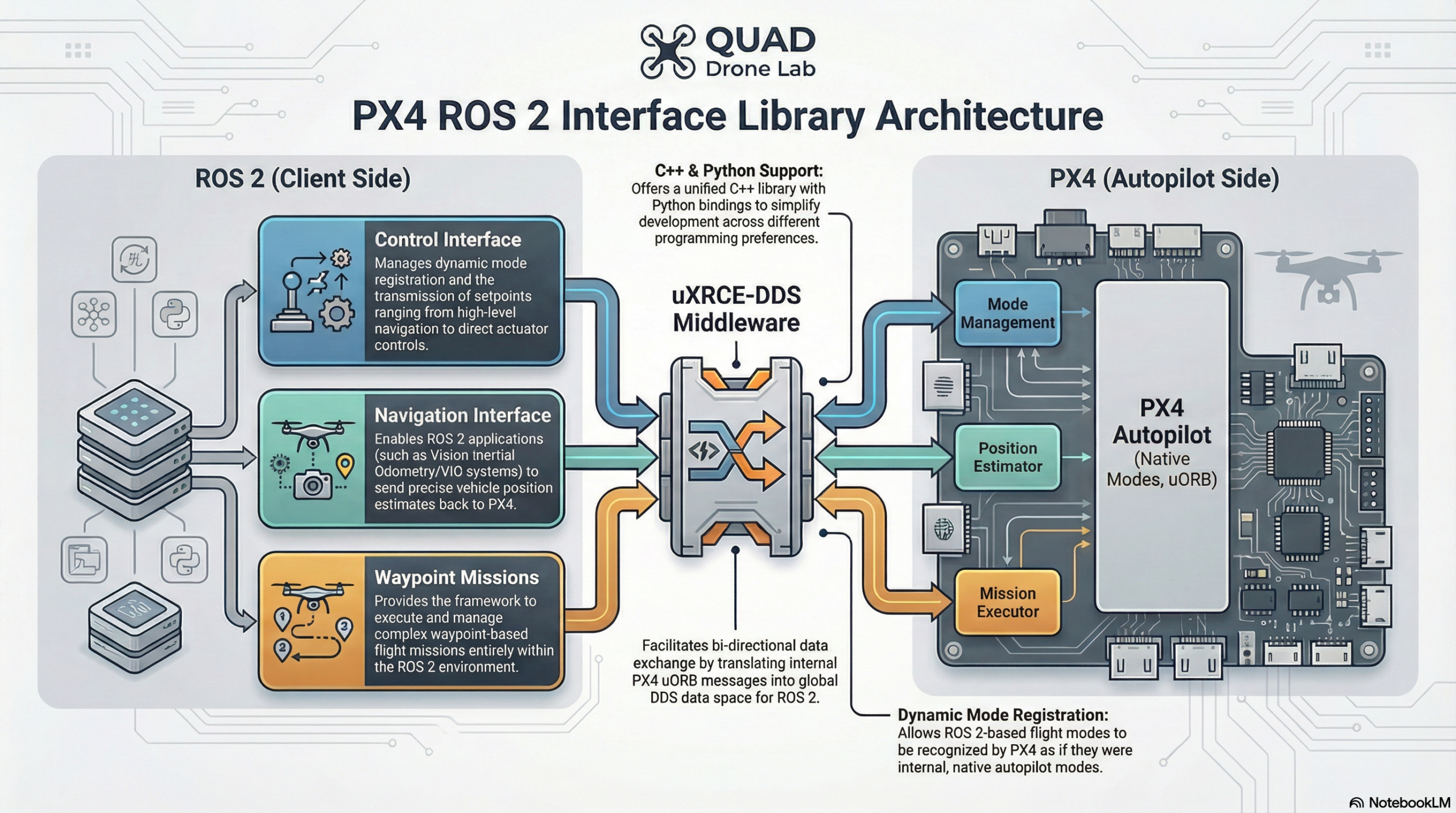
[PX4 ROS 2 Programming] Part 6: Latest & Experimental Features (Interface Library and Translation Node)
Hello once again to all the university students and researchers working day and night at the forefront of autonomous flight robotics! We have finally arrived at the concluding chapter of our long blog series, Part 6.
From Part 1 to Part 5, we have sprinted through setting up the uXRCE-DDS communication environment, mastering the tricky concepts of QoS and coordinate frames, writing foundational nodes, executing Offboard control, and finally implementing swarm simulations and robust Service-based communication. You are now equipped with an expert-level foundation for integrating ROS 2 with PX4.
However, the world of open-source development is evolving brilliantly even at this very moment. In this final installment, we will introduce two powerful experimental features from the latest PX4 versions (v1.15 and v1.16) that will dramatically accelerate your research and development speed. These are the PX4 ROS 2 Interface Library, which abstracts complex control logic, and the Message Translation Node, which enables seamless communication across different message versions.
1. Shifting the Development Paradigm: PX4 ROS 2 Interface Library (v1.15~)
When developing drones in a research lab, you often hit a wall: “I don’t want to just send coordinates in Offboard mode; I want to implement the entirely new controller from my paper as an actual Flight Mode!” Or perhaps, “I want to feed Visual Odometry (VIO) or SLAM position data into PX4, but writing the code is too complicated…”
In the past, solving this meant directly tearing into and modifying the PX4 C++ firmware, which was a painful process for researchers more accustomed to the ROS 2 ecosystem.
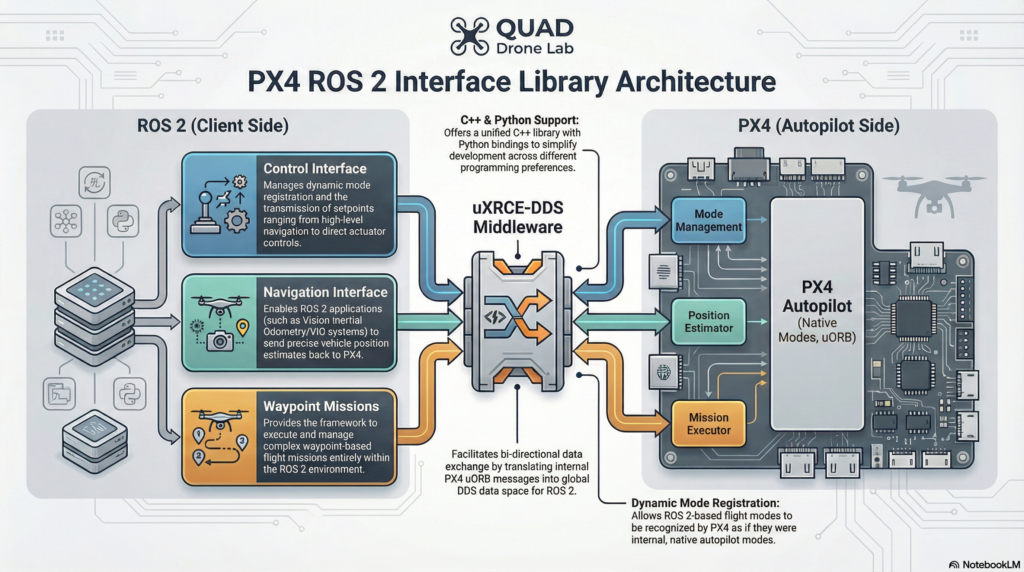
However, with the introduction of the PX4 ROS 2 Interface Library in PX4 v1.15, you can handle all of this elegantly and simply right from within your ROS 2 environment. This is an experimental C++ library (which also provides Python bindings) designed to highly simplify controlling and interacting with PX4 from ROS 2.
🌟 The 3 Core Interfaces Provided by the Library
The library provides three high-level interfaces for developers:
- Control Interface: This is the crown jewel of the library. It allows developers to create and dynamically register custom flight modes written entirely in ROS 2. It provides classes for sending various types of setpoints, ranging from high-level navigation tasks all the way down to direct actuator controls.
- Navigation Interface: This interface enables sending vehicle position estimates to PX4 from ROS 2 applications, making it incredibly easy to integrate external data like a VIO system, SLAM, or OptiTrack.
- Waypoint Missions: Traditionally, waypoint missions had to be uploaded via MAVLink from a Ground Control Station (QGC), but this feature allows waypoint missions to run entirely within ROS 2.
🚀 Installation and Setup
Getting started is very simple. You just need to clone the repository into the src folder of your existing ROS 2 workspace and build it.
# Navigate to the src folder of your ROS 2 workspace
cd ~/ros2_ws/src

# Clone the library (Crucial: Include submodules!)
git clone --recursive https://github.com/Auterion/px4-ros2-interface-lib

# Build the workspace
cd ~/ros2_ws
colcon build
source install/setup.bash
(Note: Because parts of this library are currently experimental, the API is subject to change. It is recommended to use the latest main branches for PX4, px4_msgs, and the library to ensure compatibility.)
2. Escaping the Version Mismatch Nightmare: Translation Node (v1.16~)
One of the most common screams of frustration heard in graduate labs is this: “My code worked perfectly yesterday, but I updated the PX4 version, and now all communication is broken!”
When ROS 2 and PX4 communicate via uXRCE-DDS, they share message definition files (.msg). If a single field is added or removed during a PX4 update, the previously compiled ROS 2 nodes can no longer interpret the messages, completely severing communication. Developers used to be forced to rewrite and rebuild their entire ROS 2 applications to match the new messages.
To permanently solve this issue, an innovative feature was introduced in PX4 v1.16: the PX4 ROS 2 Message Translation Node.
🛠️ Principles and Capabilities of the Translation Node
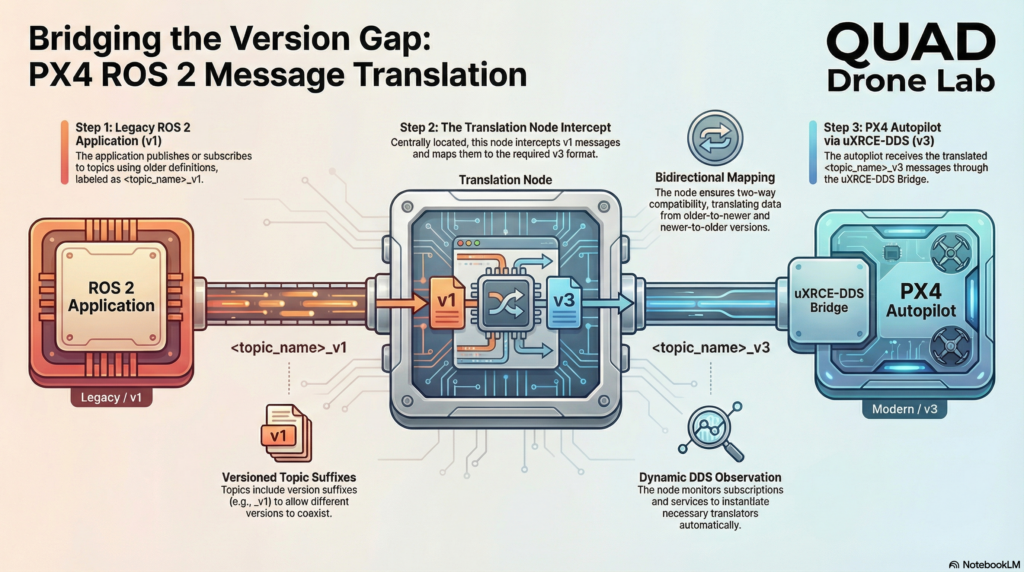
The message translation node allows ROS 2 applications compiled against different versions of PX4 messages to seamlessly interwork with newer versions of PX4 (and vice versa) without having to change either the application or the PX4 side.
It dynamically monitors the DDS data space—keeping an eye on publications, subscriptions, and services from both PX4 and ROS 2. When necessary, it acts as a middleman, converting messages to the current versions expected by both sides to ensure perfect compatibility.
To support the coexistence of different versions of the same messages, the ROS 2 topic names now include their respective message version as a suffix. This naming convention takes the form <topic_name>_v<version>. For example, version 3 of the VehicleAttitude topic would appear on the network as /fmu/out/vehicle_attitude_v3.
💻 Practical Application: Writing Version-Tolerant C++ Nodes
Does this mean we have to hardcode version numbers like _v3 into our nodes every time? Not at all! By using a template function that automatically infers the version from the message header file, you can create an elegant program that never requires a single line of code modification even when versions update.
Below is an intelligent C++ Publisher & Subscriber example that automatically recognizes the version and constructs the correct topic name.
#include <string>
#include <rclcpp/rclcpp.hpp>
#include <px4_msgs/msg/vehicle_command.hpp>
#include <px4_msgs/msg/vehicle_attitude.hpp>

// Key feature!: Template function to get the message version suffix
// The correct message version is directly inferred from the message definition
template <typename T>
std::string getMessageNameVersion() {
    // Version 0 means it's a legacy unversioned message, so return an empty string
    if (T::MESSAGE_VERSION == 0) return "";

    // If versioned, append "_v" followed by the version number (e.g., "_v3")
    return "_v" + std::to_string(T::MESSAGE_VERSION);
}

class VersionTolerantNode : public rclcpp::Node
{
public:
    VersionTolerantNode() : Node("version_tolerant_node")
    {
        // 1. Use the template function to define the correct topics automatically
        const std::string sub_topic = "/fmu/out/vehicle_attitude" + getMessageNameVersion<px4_msgs::msg::VehicleAttitude>();
        const std::string pub_topic = "/fmu/in/vehicle_command" + getMessageNameVersion<px4_msgs::msg::VehicleCommand>();

        // Let's print out the generated topic names to verify
        RCLCPP_INFO(this->get_logger(), "Subscribing to: %s", sub_topic.c_str());
        RCLCPP_INFO(this->get_logger(), "Publishing to: %s", pub_topic.c_str());

        // 2. Create the Subscriber and Publisher
        _subscription = this->create_subscription<px4_msgs::msg::VehicleAttitude>(
            sub_topic, 10,
            std::bind(&VersionTolerantNode::attitude_callback, this, std::placeholders::_1)
        );

        _publisher = this->create_publisher<px4_msgs::msg::VehicleCommand>(pub_topic, 10);
    }

private:
    void attitude_callback(const px4_msgs::msg::VehicleAttitude::SharedPtr msg) {
        RCLCPP_INFO(this->get_logger(), "Received attitude message.");
    }

    rclcpp::Publisher<px4_msgs::msg::VehicleCommand>::SharedPtr _publisher;
    rclcpp::Subscription<px4_msgs::msg::VehicleAttitude>::SharedPtr _subscription;
};

int main(int argc, char * argv[])
{
    rclcpp::init(argc, argv);
    rclcpp::spin(std::make_shared<VersionTolerantNode>());
    rclcpp::shutdown();
    return 0;
}
By utilizing the getMessageNameVersion<T>() function as shown above, the compiler automatically reads the px4_msgs version installed in your workspace and perfectly assembles the topic name. And even if this node’s version differs from the running PX4’s message version, the translation_node running in the background will seamlessly translate everything, allowing developers to focus purely on their flight algorithms!
Wrapping Up: Wishing You Success in Your Autonomous Flight Research!
With this, we conclude the entire 6-part [PX4 ROS 2 Programming] blog series.
Starting from the initial daunting task of environment setup (Part 1), we overcame the walls of QoS and coordinate frames (Part 2), exchanged data (Part 3), successfully launched a drone into the sky with our own code (Part 4), mastered swarm simulations and Service-based control (Part 5), and finally arrived today at the cutting-edge experimental features (Part 6).
You have now evolved beyond a mere “user.” You possess the capability to freely command PX4 and ROS 2—the world’s top-tier open-source flight control software suite—and expertly design the core systems of autonomous flight robots.
I sincerely hope that the brilliant AI-based avoidance algorithms, the artistry of swarm flights, and the advanced computer vision systems you bring to life in your labs will soar freely across the sky, built upon the sturdy foundation we have established together here.
Thank you so much for following along with this long series. I wish you the greatest success in both your papers and your projects. Keep up the great work!
YouTube Class

Author: maponarooo, CEO of QUAD Drone Lab
Date: February 28, 2026
![PX4 MAVSDK – C++ Programming [Episode 7] Moving to a Specific Location (goto_location) and Understanding the Haversine Formula](https://quad-drone-lab.co.kr/wp-content/uploads/2026/03/0317_인포-768x512.png)
![[ROS2 Mastery 6편] Topic 통신을 활용한 Turtlesim 자율주행 구현 가이드](https://quad-drone-lab.co.kr/wp-content/uploads/2026/05/0517_인포그래픽-768x429.jpg)
![[ROS2 Mastery 5편] ROS2 Topic 프로그래밍 (2) – Subscriber로 위치 정보 수신하기](https://quad-drone-lab.co.kr/wp-content/uploads/2026/05/0516_인포그래피-768x429.jpg)
![[PX4 Tuning Series 6] Trajectory Generator and Setpoint Tuning: The Art of Flight Feel and Smooth S-Curves](https://quad-drone-lab.co.kr/wp-content/uploads/2026/03/Drone-Trajectory-Comparison-768x429.png)
Hello, i think that i saw you visited my blog so i came to “return the favor”.I am trying
to find things to improve my site!I suppose its
ok to use some of your ideas!!