
[Hybrid Navigation System: Special Edition] Survive GPS Jamming! A Complete Guide to “PX4 Dead-Reckoning Mode”
Hello! To all the graduate students and researchers burning the midnight oil at the forefront of autonomous unmanned aerial vehicle (UAV) systems—welcome to the QUAD Drone Lab.
Throughout our series, we have built various hardware and software architectures—such as high-performance external INS, ROS 2 communication bridges, terrain contour matching, and visual servoing—designed to help our drone survive in GNSS-Denied (GPS-denied) environments.
However, this raises a very important, practical question: “If a drone is suddenly subjected to an enemy’s GPS jamming attack during flight, or if it enters a deep mountain valley or an urban canyon where the GPS signal drops out, how will the flight controller (PX4) react internally?”
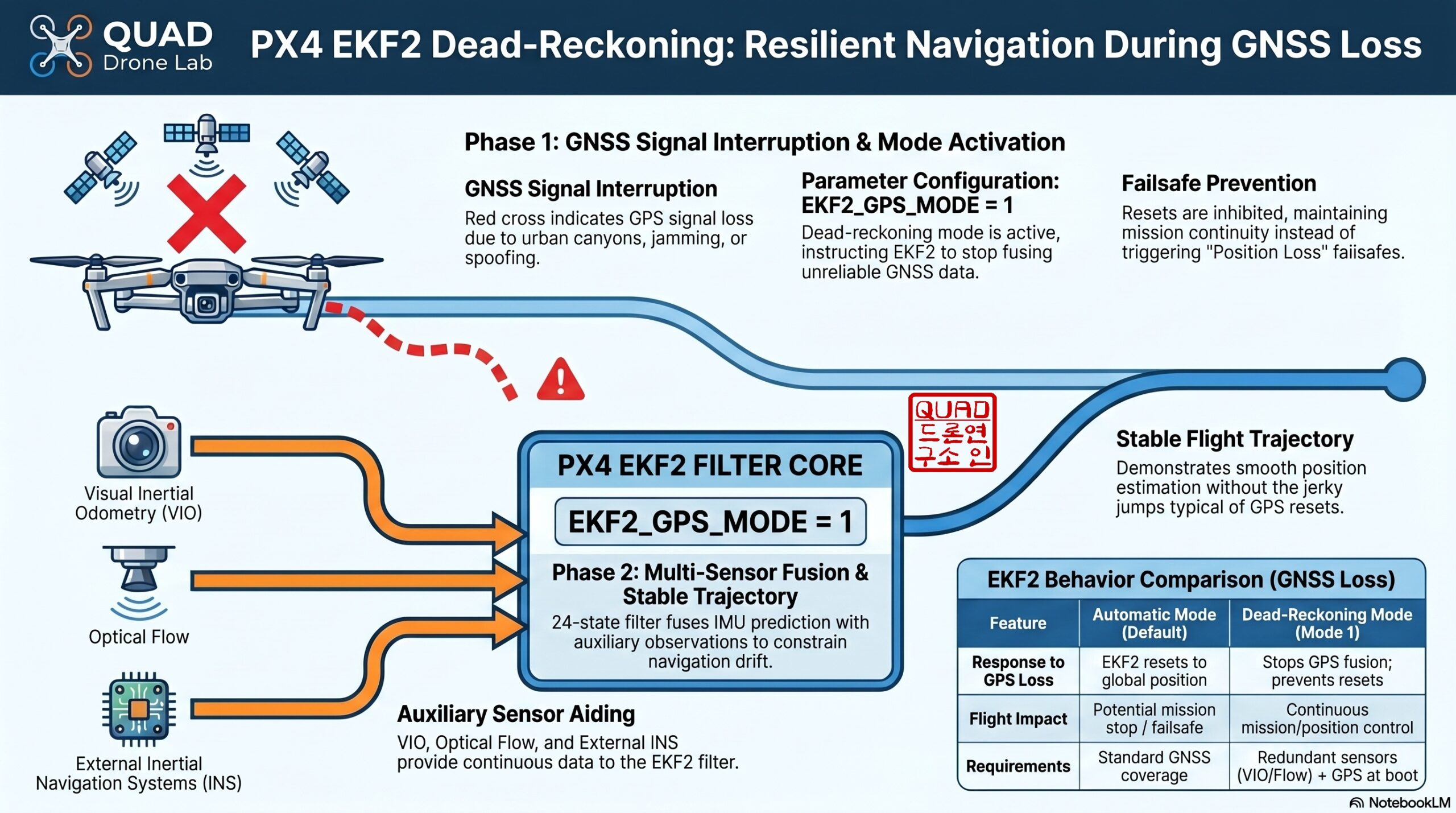
By design, if PX4 loses its GPS signal, its default safety mechanism is to abort the mission and initiate a failsafe landing (or simply crash if conditions are poor). No matter how excellent your auxiliary sensors (VIO, optical flow, external INS) are, they are practically useless if PX4 refuses to trust them and abruptly stops flying.
Today, we will deeply explore a hidden trump card in PX4 that fundamentally solves this issue: the ‘Dead-Reckoning Mode’. We will cover its principles, the exact parameter settings you need, and a hands-on method to test it safely using the Gazebo simulator and MAVSDK-Python!
1. The Two Faces of EKF2: Automatic Mode vs. Dead-Reckoning Mode
The Extended Kalman Filter 2 (EKF2), which serves as the brain of PX4, provides two distinct modes to handle situations where GPS data becomes unreliable.
- Automatic Mode (EKF2_GPS_MODE = 0, Default): This mode assumes standard outdoor flight and fully trusts the GPS signal. If the GPS drops, EKF2 will quickly trigger a failsafe to land the drone. An even bigger problem occurs if the GPS is jammed and then suddenly recovers. EKF2 will forcefully Reset its position to the newly acquired GPS coordinates, causing the drone to jerk violently in mid-air or aggressively fly to the wrong location.
- Dead-Reckoning Mode (EKF2_GPS_MODE = 1): This mode is specifically designed for environments where intermittent GNSS degradation or denial is expected. If GPS data becomes corrupted or drops, EKF2 does not force a position reset. Instead, it relies on data from other auxiliary sensors (such as VIO, optical flow, or an external INS) to smoothly maintain position control and continue flying along its designated path (Dead-Reckoning).
2. The Essential Parameter Guide for Researchers
To perfectly operate the Dead-Reckoning mode, you cannot simply flip a single switch in QGroundControl (QGC). For safe and reliable autonomous flight, the following parameters must be carefully configured together.
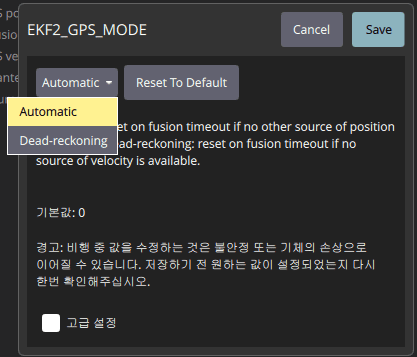
📍 Core Activation and Arming Parameters
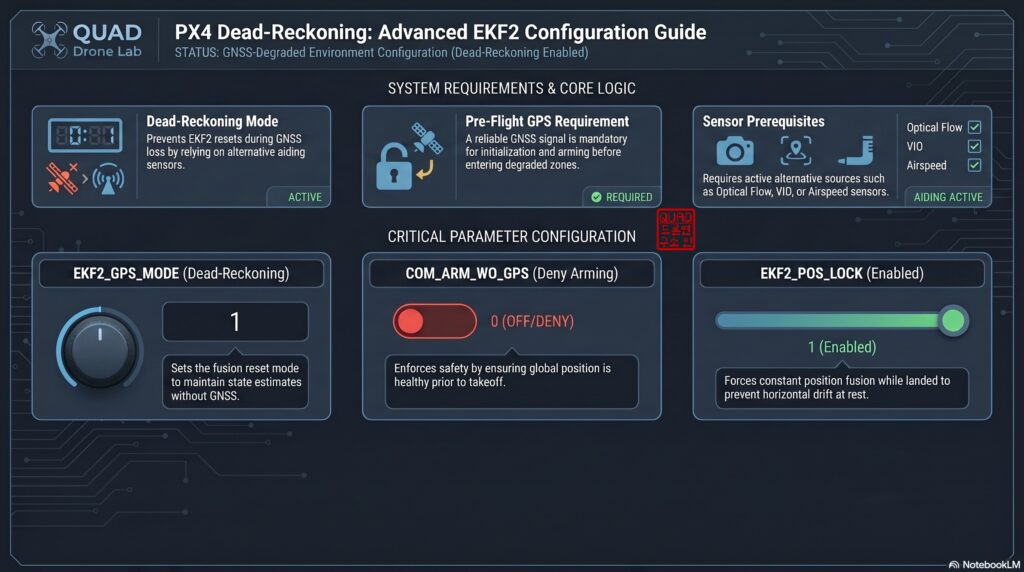
- EKF2_GPS_MODE = 1 (Dead-reckoning): The foundational switch to enable this behavior.
- COM_ARM_WO_GPS = 0 (Deny arming): [Crucial!] You must set this parameter to 0. Dead-Reckoning mode is not meant for “pure indoor environments with zero GPS from the start.” To establish a Global Coordinate Frame, the drone requires a stable GPS signal at takeoff. By setting this to 0, you ensure the drone is blocked from arming unless a perfect GPS lock is secured initially.
- EKF2_GPS_CHECK: Leave this at its default value to ensure the drone passes strict GPS quality checks before takeoff.
📍 Ground Lock and Timeout Parameters (Advanced)
- EKF2_POS_LOCK = 1 (Enabled): When a drone is resting on the ground, sensors like a fixed-wing’s airspeed sensor or a multicopter’s VIO can provide noisy data, causing the estimated position to “drift” away. Enabling this parameter locks the drone’s position to its last known coordinate while it sits idle on the ground.
- EKF2_NOAID_TOUT: This timeout value (in microseconds) determines how long the EKF will maintain dead-reckoning if even the auxiliary sensors fail.
- COM_POS_LOW_EPH: If sensor errors accumulate over time and the Estimated Position Horizontal Error (EPH) exceeds this threshold (in meters), a failsafe is triggered. For kamikaze drones needing to fly hundreds of kilometers on dead-reckoning, you must increase this value significantly or set it to
-1to disable the failsafe entirely.
📍 Auxiliary Sensor (AGP) Dead-Reckoning Parameters
- EKF2_AGP0_MODE ~ EKF2_AGP3_MODE = 1 (Dead-reckoning): If you are injecting high-performance external INS or VIO data through ROS 2 into the Auxiliary Global Position (AGP) ports, you must also set these slot modes to 1. This prevents violent jerks if there is a temporary communication delay between your companion computer and PX4.
3. Simulating a GPS Jamming Attack with Gazebo SITL and Python
In a real lab setting, physically cutting off GPS during a real flight is incredibly dangerous. Therefore, we will use the Gazebo SITL (Software-In-The-Loop) environment combined with MAVSDK-Python to safely simulate and verify a mid-flight GPS loss.
To intentionally cut the GPS signal in the simulator, we can manipulate the SIM_GPS_USED parameter (which defaults to 10 satellites) and temporarily set it to 0. If you also want to simulate the failure of an external VIO/INS, you can tweak the SIM_AGP_FAIL (0=Stuck, 1=Drift) parameter.
💻 MAVSDK-Python Test Script
The Python code below takes off, hovers, and then forces a GPS jamming scenario by setting SIM_GPS_USED to 0. It proves that the drone will not crash.
import asyncio
from mavsdk import System
from mavsdk.param import ParamValue

async def run():
    # 1. Connect to the drone system (SITL environment)
    drone = System()
    await drone.connect(system_address="udp://:14540")

    print("Waiting for drone to connect...")
    async for state in drone.core.connection_state():
        if state.is_connected:
            print("Drone connected successfully!")
            break

    # 2. Configure essential parameters (Enable Dead-Reckoning Mode)
    print("Setting EKF2_GPS_MODE to Dead-Reckoning (1)...")
    await drone.param.set_param_int("EKF2_GPS_MODE", 1)

    # Enable strict GPS check before arming
    await drone.param.set_param_int("COM_ARM_WO_GPS", 0)

    # Restore normal simulation GPS satellite count (Default is 10)
    await drone.param.set_param_int("SIM_GPS_USED", 10)

    # 3. Wait for GPS lock and prepare for takeoff
    print("Waiting for a solid GPS signal...")
    async for health in drone.telemetry.health():
        if health.is_global_position_ok and health.is_home_position_ok:
            print("GPS position locked. Ready for takeoff.")
            break

    # 4. Arm and Takeoff
    print("Arming the drone...")
    await drone.action.arm()

    print("Taking off (Target Altitude: 5m)...")
    await drone.action.takeoff()
    await asyncio.sleep(10) # Wait 10 seconds for stable hovering

    # 5. [Core Test] Simulate mid-flight GPS jamming!
    print("\n🚨 [WARNING] Enemy GPS Jamming Attack Detected! Setting SIM_GPS_USED -> 0 🚨")
    await drone.param.set_param_int("SIM_GPS_USED", 0)

    # Monitor the drone's status for 15 seconds post-jamming
    for _ in range(15):
        position = await drone.telemetry.position().__anext__()
        print(f"Current Alt: {position.relative_altitude_m:.2f}m, "
              f"Lat: {position.latitude_deg:.6f}, Lon: {position.longitude_deg:.6f} "
              f"(Maintaining flight via Dead-Reckoning...)")
        await asyncio.sleep(1)

    # 6. Conclude test and land safely
    print("\nTest completed successfully. Landing...")
    await drone.action.land()

if __name__ == "__main__":
    # Run asyncio loop for Python 3.7+
    asyncio.run(run())
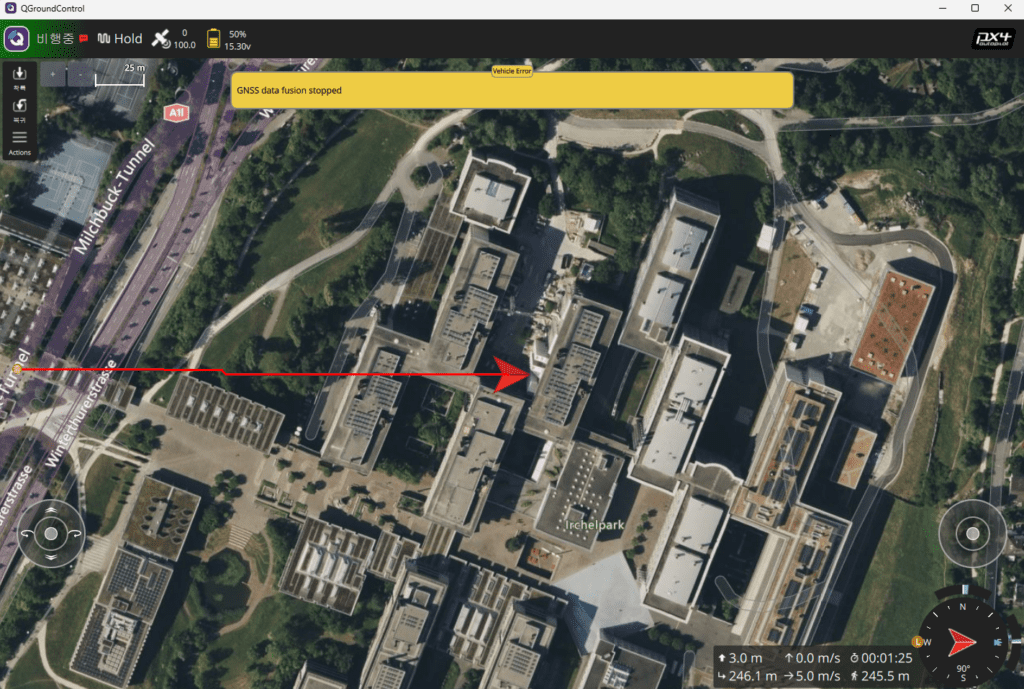
Open a terminal, launch Gazebo with make px4_sitl gz_x500, and execute this script. When the message “Enemy GPS Jamming Attack Detected!” appears and SIM_GPS_USED hits 0, you will witness firsthand that the drone does not trigger a failsafe or behave erratically. Instead, it smoothly maintains its hover using VIO and IMU data (dead-reckoning).

4. Verifying EKF2 Internal States via Flight Logs (.ulg)
If you successfully completed the simulation test, it’s time to act like a true researcher and open the flight log data to mathematically prove what happened inside the filter.
Download the generated .ulg log file and open it using PlotJuggler.
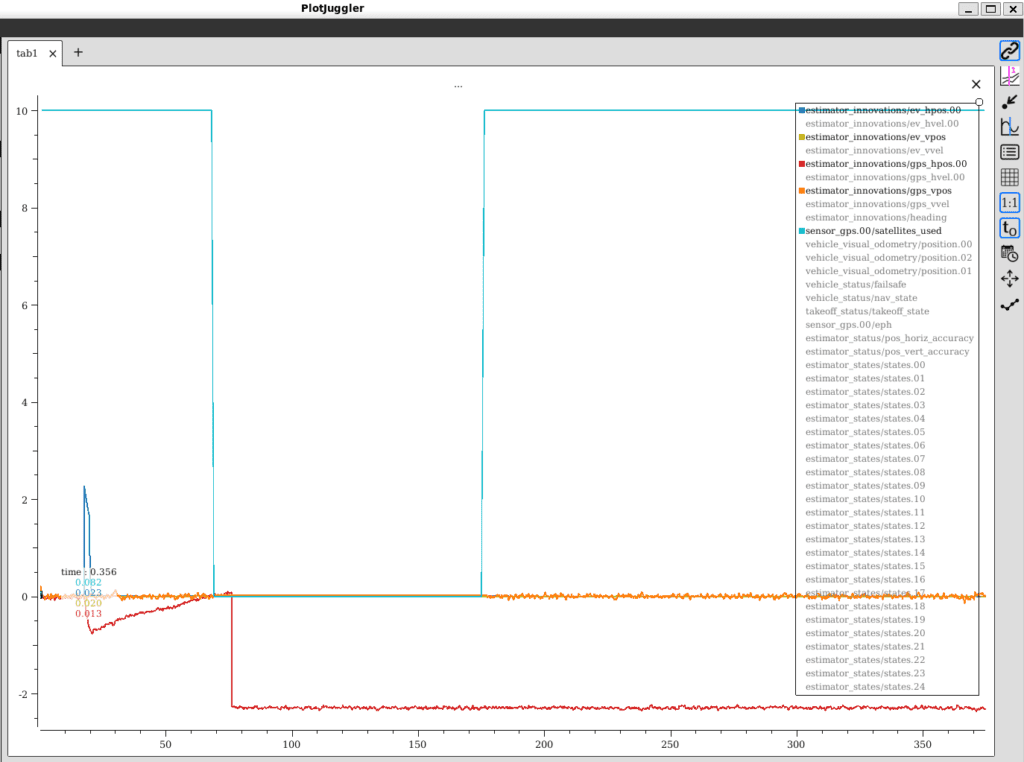
- Estimator Innovations (estimator_innovations): This topic displays the “innovation”—the error between the position predicted by the EKF2 filter and the actual sensor measurements. From the exact moment
SIM_GPS_USED = 0kicks in and the GPS signal is lost, you will see the GPS velocity and position innovation graphs stop fluctuating and become completely flat lines. - Auxiliary Sensor Fusion Verification: During this period, if VIO, airspeed, or optical flow sensors are streaming data properly, you will notice that the horizontal and vertical position control status flags are not invalidated; they remain green. (Note: If all auxiliary sensors also fail, the EKF will hold out for a few seconds based on your Timeout settings before finally surrendering and triggering an emergency landing.)
Wrapping Up
In this post, we utilized PX4’s Dead-Reckoning Mode to build a critical software safety net that allows our UAV to survive in GPS-denied environments. By understanding the hidden roles of parameters like EKF2_GPS_MODE and learning how to conduct simulated jamming tests via Gazebo and MAVSDK, you have laid the groundwork to confidently fly through severe weather or electronic warfare conditions.
Moving forward, the advanced hybrid navigation systems we build (such as vision-based terrain matching and precision visual servoing) will run precisely on top of this robust dead-reckoning foundation. At QUAD Drone Lab, we always support your dedication and challenges in breaking technological limits to shape the new paradigm of UAV navigation!
If you have any questions or need help analyzing your flight logs, feel free to leave a comment or email us at any time! Thank you.
YouTube Tutorial

Author: maponarooo, CEO of QUAD Drone Lab
Date: May 29, 2026

![[Hybrid Navigation System Series Part 1: Overview] Flying Hundreds of Kilometers Without GPS? Learning a Hybrid Navigation System from WWII Pilots](https://quad-drone-lab.co.kr/wp-content/uploads/2026/04/컴패니언-컴퓨터-기반의-AI-지형지물-보정-768x419.jpg)
![[ROS2 Mastery 8편] 로봇 수학의 핵심, TF2(Transform) 시스템 개요 완벽 가이드](https://quad-drone-lab.co.kr/wp-content/uploads/2026/05/0531_인포그래피-768x384.png)
![PX4 MAVSDK – C++ Programming [12편] MAVSDK C++를 활용한 최신 자율 비행 연구 사례](https://quad-drone-lab.co.kr/wp-content/uploads/2026/03/0322_인프그래피2-768x429.jpg)