

[PX4 ROS 2 Programming] Part 5: Advanced Techniques (Service Servers and Multi-Vehicle Simulation)
Hello again, university students and researchers delving into autonomous flight robotics and drone swarm systems! It is a great pleasure to have you back.
In Part 4, we explored the highlight of flight control: “Offboard Control.” We wrote a C++ node in ROS 2 to arm the drone and make it take off to a target altitude. If you have successfully completed that step, you have essentially mastered the fundamental ROS 2 architecture for controlling a single vehicle.
However, in actual research environments, the requirements become much more complex. You might wonder, “How can I guarantee that my takeoff command was actually received and not lost in the network?” Or you might think, “I want to test a swarm flight algorithm by launching multiple drones at once, not just one!”
Therefore, in this Part 5, we will elevate your research capabilities by diving deep into two highly advanced techniques: PX4 ROS 2 Service Communication and Multi-Vehicle Simulation Control.
1. Guaranteeing Commands and Responses: PX4 ROS 2 Services
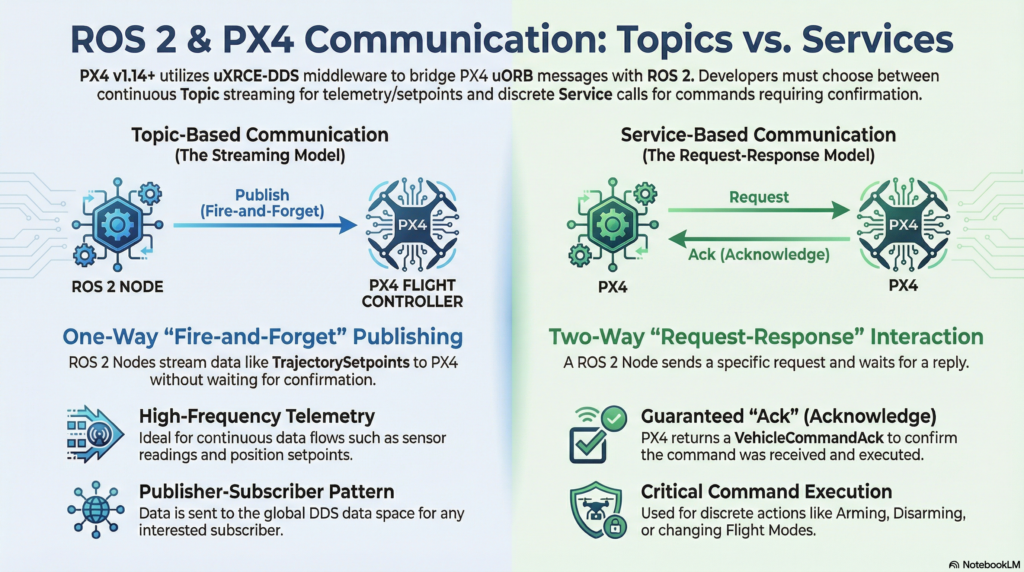
Communication in ROS 2 is broadly divided into two paradigms: the Topic method (Publish/Subscribe), which broadcasts data one-way, and the Service method (Client/Server), which sends a request and waits for a response.
In Part 4, we armed the drone by publishing a VehicleCommand message as a Topic. While this is easy to implement, it relies on a “Fire-and-Forget” approach. If PX4 ignores the command due to network latency or internal state issues, the ROS 2 node has no direct way of knowing.
When researchers are designing reinforcement learning algorithms or precision control logic, this uncertainty can lead to critical bugs. To solve this, PX4 v1.15 officially introduced ROS 2 Service server capabilities into the uXRCE-DDS middleware.
Utilizing the VehicleCommand Service
PX4 provides a service server named /fmu/vehicle_command. When a ROS 2 application (the client) sends a VehicleCommand request to this service, PX4 processes the command and returns a VehicleCommandAck (Acknowledge) message containing the success or failure status exactly back to the requester.
Let’s see how to write this in code. Below is the core snippet of a C++ example that asynchronously sends an Arm request and handles the response.
#include <rclcpp/rclcpp.hpp>
#include <px4_msgs/srv/vehicle_command.hpp> // Note: We use the .srv header, not the .msg!

using namespace std::chrono_literals;

class OffboardControlSrv : public rclcpp::Node
{
public:
    OffboardControlSrv() : Node("offboard_control_srv")
    {
        // 1. Create the VehicleCommand Service Client
        vehicle_command_client_ = this->create_client<px4_msgs::srv::VehicleCommand>("/fmu/vehicle_command");
    }

    // Function to request vehicle arming
    void request_arm()
    {
        RCLCPP_INFO(this->get_logger(), "Requesting vehicle Arm...");

        // 2. Create the Service Request object and populate the data
        auto request = std::make_shared<px4_msgs::srv::VehicleCommand::Request>();
        px4_msgs::msg::VehicleCommand msg{};
        msg.command = px4_msgs::msg::VehicleCommand::VEHICLE_CMD_COMPONENT_ARM_DISARM;
        msg.param1 = 1.0; // 1.0 means Arm
        msg.target_system = 1;
        msg.target_component = 1;
        msg.source_system = 1;
        msg.source_component = 1;
        msg.from_external = true;
        msg.timestamp = this->get_clock()->now().nanoseconds() / 1000;

        request->request = msg;

        // 3. Send the async service request and bind the callback function (response_callback)
        auto result = vehicle_command_client_->async_send_request(
            request,
            std::bind(&OffboardControlSrv::response_callback, this, std::placeholders::_1)
        );
        RCLCPP_INFO(this->get_logger(), "Command dispatched to the network.");
    }

private:
    rclcpp::Client<px4_msgs::srv::VehicleCommand>::SharedPtr vehicle_command_client_;

    // 4. Callback function to handle the incoming response
    void response_callback(rclcpp::Client<px4_msgs::srv::VehicleCommand>::SharedFuture future)
    {
        // Wait up to 1 second to check if the response has arrived
        auto status = future.wait_for(1s);
        if (status == std::future_status::ready) {
            // Response received successfully!
            auto reply = future.get()->reply;
            RCLCPP_INFO(this->get_logger(), "Response received! Result code: %d", reply.result);
            // If reply.result is 0 (VEHICLE_CMD_RESULT_ACCEPTED), the command was successfully executed.
        } else {
            RCLCPP_INFO(this->get_logger(), "Waiting for service response or request failed...");
        }
    }
};
Detailed Code Breakdown:
- Creating the Client: We use
this->create_client<px4_msgs::srv::VehicleCommand>to open a communication channel to the/fmu/vehicle_commandservice. - Asynchronous Request (async_send_request): In robotics programming, a blocking function can be highly dangerous. Instead of blindly waiting for a response, we use
async_send_requestto dispatch the command and instruct the system to “executeresponse_callbackwhenever the reply arrives”. - Verifying the Response (future.wait_for): Inside the callback function, we unpack the
VehicleCommandAckdata sent by PX4 usingfuture.get()->reply. Ifreply.resultequals 0, congratulations! Your drone is perfectly armed and ready to fly.
By using this technique, you can design a highly robust and reliable State Machine, such as: “Command Takeoff → Verify Success → Fly to Target → Verify Success → Land.”
2. Breaking the Limits: Multi-Vehicle Simulation Control
Once you have perfectly mastered controlling a single drone, the natural next step is transitioning to Multi-Vehicle (Swarm) Flight. In the past, you had to launch separate communication agents for every single drone, which consumed a lot of computing resources. However, with the introduction of uXRCE-DDS, a single Agent can now simultaneously connect to and control multiple PX4 clients (drones) over a UDP network.

To successfully control a multi-vehicle simulation, researchers must thoroughly understand the following three core rules.
1) px4_instance and Namespaces
When you spawn multiple drones in a simulator (like Gazebo), PX4 internally assigns a unique px4_instance number to each vehicle, starting from 0. To prevent the data streams from multiple drones from getting tangled up in the ROS 2 network, the system uses this number to automatically attach a Namespace prefix to the topics.
px4_instance = 0(1st Drone): No namespace is added by default (to maintain consistency with a real, single-vehicle setup). Topic name:/fmu/out/sensor_combinedpx4_instance = 1(2nd Drone): The prefixpx4_1is added. Topic name:/px4_1/fmu/out/sensor_combinedpx4_instance = 2(3rd Drone): The prefixpx4_2is added. Topic name:/px4_2/fmu/out/sensor_combined
Therefore, when writing a node to subscribe to data or publish commands to a specific drone, you must accurately specify this namespace at the beginning of your topic strings.
2) Automatic Assignment of System ID (MAV_SYS_ID)
In a multi-vehicle environment, each drone possesses a unique identification tag called the MAVLink System ID (MAV_SYS_ID). In simulation, this value is automatically calculated based on the px4_instance. The formula is very simple: MAV_SYS_ID = px4_instance + 1
- 1st Drone (
instance 0):MAV_SYS_ID= 1 - 2nd Drone (
instance 1):MAV_SYS_ID= 2 - 3rd Drone (
instance 2):MAV_SYS_ID= 3
3) ★ The Most Common Mistake: Matching the target_system Value ★
This is the number one culprit that keeps graduate students awake all night when coding swarm flights!
When you create a VehicleCommand message to issue an instruction, there is a field called target_system. PX4 will only execute the incoming command if the target_system value exactly matches its own MAV_SYS_ID (or is 0 for a broadcast). If the IDs do not match, PX4 will completely ignore the message.
For example, if you want to send an arming command to the third drone (px4_instance = 2), you must write your code like this:
// 1. Create a publisher (or service client) matching the correct namespace
auto publisher = this->create_publisher<px4_msgs::msg::VehicleCommand>("/px4_2/fmu/in/vehicle_command", 10);

// 2. Precisely assign the drone's System ID to the target_system field!
px4_msgs::msg::VehicleCommand msg{};
msg.command = px4_msgs::msg::VehicleCommand::VEHICLE_CMD_COMPONENT_ARM_DISARM;
msg.param1 = 1.0;

// Since px4_instance is 2, the System ID is 2 + 1 = 3.
msg.target_system = 3;  // <--- If you get this wrong, the drone will ignore you!
msg.target_component = 1;
// ... (Fill in the rest of the message)
publisher->publish(msg);
As long as you firmly imprint this rule in your mind, controlling a spectacular swarm flight simulation of dozens of drones painting the night sky will be right at your fingertips.
Wrapping Up
In this Part 5, we equipped ourselves with two heavy-duty weapons that will dramatically elevate the quality of your robotics research:
- PX4 ROS 2 Service (VehicleCommand) Communication: Moving beyond one-way commands to guarantee reliable execution via Ack responses.
- Multi-Vehicle Control Methods: Mastering swarm simulations through precise matching of topic namespaces and
target_systemIDs.
With the knowledge covered from Parts 1 through 5, you have now built an incredibly solid, expert-level foundation for designing and implementing ROS 2-based autonomous drone systems. Now, it is time to build upon this framework by integrating your own creative computer vision algorithms or AI reinforcement learning models, and let your drones freely conquer the skies.
In our final installment, Part 6: Latest & Experimental Features (Interface Library and Translation Node), we will conclude this long blog series by introducing the powerful new C++ libraries brought to PX4’s latest versions (v1.15, v1.16), as well as real-time message version translation techniques.
If you have any questions or run into roadblocks, feel free to leave a comment. Best of luck with your successful multi-vehicle simulations!
YouTube Class

Author: maponarooo, CEO of QUAD Drone Lab
Date: February 28, 2026
![PX4 MAVSDK – C++ Programming [9편] 정밀한 드론 제어: 오프보드(Offboard) 모드](https://quad-drone-lab.co.kr/wp-content/uploads/2026/03/0319_인포그래픽-768x429.jpg)
![[Everything About Drone Batteries]Part 2: Key Indicators Determining Flight Performance: Discharge Rate (C-Rating) and Internal Resistance (IR)](https://quad-drone-lab.co.kr/wp-content/uploads/2026/04/Battery-C-Rating-Label-vs-Reality-1-768x429.jpg)