
MAVLink Protocol Explained for Pixhawk & PX4 Developers
What is the MAVLink Protocol?
MAVLink (Micro Air Vehicle Link) is an open-source, lightweight messaging protocol designed for efficient data communication between drones, robots, and other automated systems. It has established itself as the de facto standard for communication between Autopilots (such as Pixhawk) and Ground Control Stations (GCS).
Historical Background and Necessity of MAVLink
In the early stages of drone development, each manufacturer or project utilized its own proprietary communication protocol. This caused significant compatibility issues and created immense difficulties in integrating diverse hardware and software components. MAVLink was created to resolve this fragmentation, allowing developers to build and interoperate drone systems in a standardized manner. Along with the growth of the ArduPilot and PX4 projects, MAVLink has evolved rapidly and has become a core element of the drone ecosystem.
Analysis of MAVLink Protocol Structure
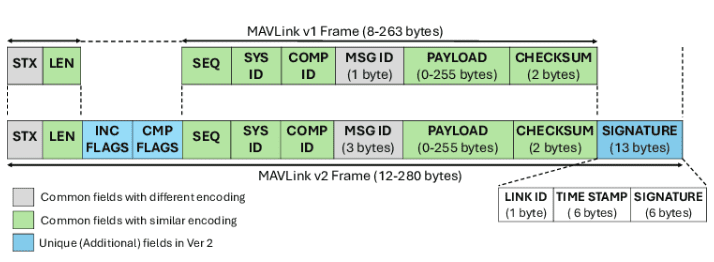
The MAVLink protocol operates on a message-based system, where each message has a specific structure. There are two primary versions, MAVLink 1.0 and MAVLink 2.0, with version 2.0 being an extended and improved version of 1.0.

MAVLink 1.0 Message Structure
A MAVLink 1.0 message consists of the following fields:
-
Start Byte (1 byte): A fixed value indicating the start of a message (typically 0xFE).
-
Payload Length (1 byte): Indicates the length of the actual payload (data), up to a maximum of 255 bytes.
-
Packet Sequence (1 byte): A number indicating the order of packets, used to detect packet loss.
-
System ID (1 byte): The ID of the system that sent the message (e.g., Pixhawk is 1, GCS is 255).
-
Component ID (1 byte): The ID of a specific component within the sending system (e.g., Autopilot, Camera).
-
Message ID (1 byte): A unique ID identifying the type of message (e.g., 0x00 is HEARTBEAT).
-
Payload (variable length): The actual data being transmitted; its structure varies depending on the Message ID.
-
CRC (2 bytes): A checksum used to verify the integrity of the message.
MAVLink 2.0 Message Structure
MAVLink 2.0 was introduced to overcome the limitations of MAVLink 1.0. The key improvements are as follows:
-
Extended Payload Length: Expanded to allow the payload length to exceed 255 bytes.
-
Signature: A signature field was added for message authentication, allowing verification of the message source and prevention of tampering.
-
System and Component ID Expansion: Expanded from 1 byte to 2 bytes to identify more systems and components.
-
New Message Types: Additional message types were added to transmit more information efficiently.
The MAVLink 2.0 message structure is as follows:
-
Start Byte (1 byte): 0xFD (different from MAVLink 1.0).
-
Incompatibility Flag (1 byte): Indicates compatibility with MAVLink 1.0 systems.
-
Sequence (1 byte): Packet sequence.
-
System ID (1 byte): System ID.
-
Component ID (1 byte): Component ID.
-
Message ID (4 bytes): Message ID; expanded from 1 byte in v1.0 to 4 bytes in v2.0 to support more message types.
-
Payload (variable length): The actual data.
-
CRC (2 bytes): Checksum.
-
Signature (optional, 13 bytes): Signature for authentication.
Key MAVLink Message Types
MAVLink defines a wide variety of message types. Let’s look at some of the most important messages:
-
HEARTBEAT (ID: 0): A message that periodically reports the system status. It includes information such as system type, autopilot status, mode, and heartbeat. The GCS uses this to determine the status of the connected drone.
-
COMMAND_LONG (ID: 76): Used when the GCS sends commands to the drone. For example, commands such as moving to a specific waypoint or starting/stopping a mission can be sent.
-
ATTITUDE (ID: 30): Contains the attitude information of the drone. It includes roll, pitch, and yaw angles, as well as angular velocity, accelerometer, and gyroscope data.
-
GLOBAL_POSITION_INT (ID: 33): Provides the absolute position information of the drone. It includes latitude, longitude, altitude, speed, and timestamp.
-
RC_CHANNELS_RAW (ID: 35): Represents the channel data input from the Remote Controller (RC). It is used to convert the pilot’s input so that the GCS or the drone can understand it.
-
SYS_STATUS (ID: 1): Provides general status information of the system. It includes voltage, current, error codes, and more.
Utilization of MAVLink in Pixhawk and PX4
Pixhawk is an open-source autopilot hardware platform, and PX4 is a leading open-source autopilot software stack that runs on it. MAVLink plays a critical role within the Pixhawk and PX4 systems.
Pixhawk and MAVLink
The Pixhawk board controls various sensors and actuators, using MAVLink to exchange this data and commands with external systems.
-
Communication with GCS: Pixhawk communicates with Ground Control Stations (GCS) such as QGroundControl and Mission Planner via MAVLink. This allows users to check the drone’s real-time position, sensor data, and system status, as well as establish mission plans and transmit commands.
-
Communication with Companion Computers: Pixhawk can communicate with companion computers, such as a Raspberry Pi, through MAVLink. This is useful for performing complex tasks like advanced vision processing and AI-based decision-making.
-
Telemetry Data: Pixhawk continuously transmits various telemetry data to the GCS via MAVLink. This includes GPS position, IMU sensor values, battery status, flight modes, and more.
The PX4 firmware performs drone flight control, mission management, and sensor data processing based on the MAVLink protocol.
-
MAVLink Shell (MAVSHELL): PX4 provides remote shell access via MAVLink. This enables debugging and configuration tasks, such as querying or modifying internal parameters and downloading logs.
-
MAVLink Routing: PX4 has built-in MAVLink router functionality to manage multiple MAVLink streams and deliver them to appropriate destinations. For example, MAVLink data can be exchanged through various interfaces like USB, serial ports, and Wi-Fi.
-
MAVLink API: PX4 provides APIs for generating and parsing MAVLink messages. Developers can use these to create custom applications that interact with the PX4 system.
Example of MAVLink Data Flow in Pixhawk/PX4
-
Boot and Initialization: When Pixhawk boots up, the PX4 firmware starts and initializes MAVLink communication.
-
Heartbeat Transmission: PX4 periodically transmits
HEARTBEATmessages to announce that it is functioning normally. -
Sensor Data Transmission: It collects data from sensors like the IMU, GPS, and barometer, converts them into MAVLink messages such as
ATTITUDE,GLOBAL_POSITION_INT, andSYS_STATUS, and transmits them. -
GCS Command Reception: When the GCS sends commands like starting a mission or setting waypoints via
COMMAND_LONGmessages, PX4 receives and processes them. -
Telemetry Data: Real-time flight information, battery status, and sensor values are continuously transmitted to the GCS for user monitoring.
-
Debugging and Configuration: Internal variables are checked or setting values are changed through the MAVLink Shell.
Implementation and Use of the MAVLink Protocol
To understand and utilize the MAVLink protocol, it is helpful to know several implementation and usage methods.
MAVLink Libraries
Libraries for various programming languages are provided to easily implement and use the MAVLink protocol.
-
pymavlink (Python): Widely used for generating, parsing, transmitting, and receiving MAVLink messages in a Python environment. It is useful for GCS application development, drone simulation, and data analysis.
-
mavlink-router: A C++ library used for routing and filtering MAVLink packets. It is effective for managing communication between multiple MAVLink devices.
MAVSDK: A high-level MAVLink-based API library supporting various languages such as C++, Python, and Swift. It helps develop drone control applications more easily and quickly.
MAVLink Message Generation and Parsing
If you need to directly generate or parse MAVLink messages, you should refer to the message structure defined in the common.xml file. This XML file specifies the field names, types, and order of all standard MAVLink messages.
<message id="30" name="ATTITUDE">

<field type="uint64_t" name="time_boot_ms">Timestamp (time since system boot).</field>

<field type="int32_t" name="roll">Roll angle (NaN if unknown)</field>

<field type="int32_t" name="pitch">Pitch angle (NaN if unknown)</field>

<field type="int32_t" name="yaw">Yaw angle (NaN if unknown)</field>

<field type="int32_t" name="rollspeed">Roll angular speed (NaN if unknown)</field>

<field type="int32_t" name="pitchspeed">Pitch angular speed (NaN if unknown)</field>

<field type="int32_t" name="yawspeed">Yaw angular speed (NaN if unknown)</field>

</message>
Based on this information, using libraries like pymavlink allows you to easily generate and send ATTITUDE messages in Python.
MAVLink Communication Setup
When configuring MAVLink communication, the following factors must be considered:
-
Ports and Interfaces: You must specify the serial port (e.g.,
/dev/ttyACM0) or network address (IP:Port) for communication. -
Baudrate: For serial communication, the baudrate between the transmitting and receiving devices must match. Commonly used rates include 57600, 115200, and 921600 bps.
-
System and Component IDs: A unique System ID and Component ID must be assigned to each communicating device. This is crucial for message routing and identification.
-
MAVLink Version: Since there are incompatibilities between MAVLink 1.0 and 2.0, all devices in the network should use the same version or be set to a compatibility mode.
Advanced Topics and Considerations in the MAVLink Protocol
To utilize the MAVLink protocol professionally, several advanced topics and considerations are involved:
Advantages and Applications of MAVLink 2.0
MAVLink 2.0 provides several critical improvements over 1.0:
-
Enhanced Security: The signature field allows for source authentication and ensures message integrity, which is essential for protecting drone systems from malicious attacks.
-
Expanded Message Identification: By using a 4-byte Message ID, it supports a much larger number of message types, providing flexibility for future protocol development and new features.
-
Larger Payload: It is more efficient when transmitting long data strings.
-
Compatibility: MAVLink 2.0 is designed to maintain backward compatibility with MAVLink 1.0. Communication with 1.0 devices can be managed via the
incompatibility_flag.
While MAVLink is a lightweight protocol, performance optimization may be necessary in specific environments:
-
Message Filtering: It is not necessary to receive every message. Selectively filtering for only required messages saves CPU cycles and bandwidth.
-
Transmission Frequency Adjustment: Reducing the frequency of periodic messages, such as
HEARTBEAT, can minimize unnecessary traffic. -
Custom Messages: If standard MAVLink messages are insufficient, extended parameter messages (like
PARAM_EXT_SET,PARAM_EXT_GET) or user-defined messages can be utilized.
MAVLink and Middleware
MAVLink is often used in conjunction with robotic middleware like ROS (Robot Operating System):
- MAVROS: A ROS package designed for MAVLink communication. It provides translation between ROS topics and MAVLink messages, facilitating the development of ROS-based drone applications. MAVROS allows ROS nodes to easily publish and subscribe to MAVLink messages.
- Data Integration: Through MAVROS, sensor data and flight status collected via MAVLink can be shared and processed with other nodes within the ROS graph.
MAVLink Security Considerations
MAVLink communication can be vulnerable to security threats, especially when conducted over public wireless channels:
-
Authentication and Encryption: Users should leverage the signature feature of MAVLink 2.0 or use additional security layers like VPN and TLS/SSL to protect communication.
-
System and Component ID Management: It is advisable to assign IDs dynamically or set up access controls so that only authorized systems can communicate.
-
Data Integrity: Beyond the CRC, additional verification mechanisms can be considered.
Conclusion
The MAVLink protocol has established itself as the core communication method for modern drone systems like Pixhawk and PX4. Based on its lightweight nature, efficiency, and scalability, it enables seamless data exchange between the drone, ground control stations, and onboard computers. Understanding the MAVLink structure, message types, and its application within Pixhawk/PX4 is essential for professionals who develop and operate drone systems. The introduction of MAVLink 2.0 has further strengthened security and functionality, and integration with libraries like pymavlink and MAVSDK, alongside MAVROS, significantly enhances development productivity.
Core Summary and Action Items
-
Standard Protocol: MAVLink is the standard protocol for drone communication and is essentially integrated with Pixhawk/PX4.
-
Structural Evolution: Understand the structural differences between MAVLink 1.0 and 2.0, and leverage the security and scalability advantages of MAVLink 2.0.
-
Practical Implementation: Practice directly handling MAVLink messages by using libraries such as pymavlink or MAVSDK.
-
ROS Integration: In a ROS environment, implement the link between MAVLink and ROS through MAVROS.
EXTERNAL_LINKS: MAVLink Official Website, PX4 Developer Guide, QGroundControl
Expand your knowledge through the QUAD Drone Research Institute YouTube Membership.

Author: maponarooo, Pixhawk Drone Mania.
Date: February 7, 2026
![PX4 MAVSDK – C++ Programming [7편] 특정 위치로 이동 (goto_location) 및 하버사인 공식의 이해](https://quad-drone-lab.co.kr/wp-content/uploads/2026/03/0317_인포-768x512.png)
![[Hybrid Navigation System Series Part 5: Implementation-Stage 1] Cruising Phase: Classical Dead Reckoning, Wind Estimation, and Gazebo Wind Simulation](https://quad-drone-lab.co.kr/wp-content/uploads/2026/05/Drone-Vector-Navigation-Crab-Angle-768x429.png)
![ROS2 Mastery [Part 2] Core Communication Concepts of ROS2 and How to Use the Powerful Utility “RQT”](https://quad-drone-lab.co.kr/wp-content/uploads/2026/03/0331_그림6-768x512.png)
![PX4 MAVSDK – C++ Programming [3편] MAVSDK C++ 설치 및 SITL 시뮬레이션 환경 구축](https://quad-drone-lab.co.kr/wp-content/uploads/2026/03/0313_인포그래픽-768x419.jpg)