

The Ultimate Guide to MAVSDK-Python Programming [Part 10]: Enhancing Target Reaching Efficiency with Feed-Forward Simultaneous Control
Hello and welcome back, university students and researchers dedicating yourselves to autonomous flight robotics and drone control algorithms! Welcome to the grand tenth installment of our MAVSDK-Python blog series.
Throughout [Part 8] and [Part 9], we deeply explored Position Control, which commands the vehicle to move to specific coordinates, and Velocity Control, which dictates the vehicle’s heading and speed. While you can perform excellent autonomous flight missions using just these two methods, they possess certain limitations when trying to extract extreme performance in “dynamic environments”—such as drone racing or ultra-precise 3D trajectory tracking.
If you simply command “go to this position” or “fly at this speed” individually, the internal controller consumes time trying to reduce the error step-by-step. This often results in sluggish acceleration or overshooting, where the drone flies past the target point before braking.
To perfectly solve this and maximize target-reaching efficiency, advanced control engineering utilizes a technique called ‘Feed-Forward’ control.
In this [Part 10: Enhancing Target Reaching Efficiency with Feed-Forward Simultaneous Control], we will solidify the theoretical background of how feed-forward works in the PX4 flight controller, and kindly tear down a powerful MAVSDK example code that controls both position and velocity simultaneously line by line.
1. The Crown Jewel of Control Engineering: What is Feed-Forward?
If you have taken undergraduate control engineering classes or read robotics papers, you have likely encountered the terms ‘Feedback’ and ‘Feed-Forward’ quite often.
Standard drone position control is based on ‘Feedback Control’. This means the system continuously compares the target position with the drone’s current position to calculate the ‘Error’, and generates a control signal to reduce that error. The fatal flaw of this method is that “the vehicle only starts reacting after an error has occurred.” Consequently, acceleration is slow upon departure, and time is delayed as the drone abruptly decelerates near the target.
On the other hand, ‘Feed-Forward’ is a technique that proactively reflects anticipated system behavior or external commands into the control signal in advance. You are essentially informing the controller of the future target state ahead of time.

For example, when you need to move the vehicle 50 meters North, instead of simply commanding “Go to the 50m position (Position Control),” you command, “Go to the 50m position, but simultaneously inject a forward velocity of 1.0m/s in that direction!”
By providing this feed-forward value, the drone doesn’t wait for the positional error to grow. It immediately adds the commanded acceleration/velocity to the control signal, allowing it to reach the target speed and position much faster and smoother. This exponentially improves responsiveness and precision in dynamic environments.
2. Simultaneous Control in MAVSDK: set_position_velocity_ned
To implement this feed-forward concept, MAVSDK provides an incredibly intuitive and powerful method called set_position_velocity_ned().
As the name suggests, this function takes two classes we learned in previous sessions as simultaneous parameters: PositionNedYaw (representing the target position) and VelocityNedYaw (representing the target velocity or feed-forward value).
Let’s analyze the core logic to see how this is implemented in code.
① EKF Origin Initialization
This is the most critical safety failsafe before entering Offboard mode. We initialize the setpoint to 0, 0, 0 using the set_position_ned method.
print("-- Setting initial setpoint")
await drone.offboard.set_position_ned(PositionNedYaw(0.0, 0.0, 0.0, 0.0))
② Asynchronous Real-time Altitude and Velocity Monitoring
To verify how precisely the feed-forward control is applied, we create a background task using telemetry to print the vehicle’s real-time velocity to the terminal.
async def print_z_velocity(drone):
    async for odom in drone.telemetry.position_velocity_ned():
        print(f"North Velocity: {odom.velocity.north_m_s:.2f} m/s, Down Velocity: {odom.velocity.down_m_s:.2f} m/s")

# Execute as a background parallel task using Python asyncio's ensure_future
asyncio.ensure_future(print_z_velocity(drone))
💡 Note: On low-spec PCs or VM environments, overly frequent asynchronous printing might cause CPU load or errors, so adjust the output frequency accordingly.
③ Takeoff (Altitude Control + Upward Feed-Forward Velocity)
Now let’s lift the vehicle 10 meters into the air. Remember that since this is based on the Z-axis (Down), we must apply a negative (-) value!
print("-- Go 0m North, 0m East, -10m Down (Apply FF velocity)")
await drone.offboard.set_position_velocity_ned(
    PositionNedYaw(0.0, 0.0, -10.0, 0.0), # Target Position: 10m Up
    VelocityNedYaw(0.0, 0.0, -1.0, 0.0)   # Target Velocity (FF): 1.0m/s Up
)
await asyncio.sleep(10)
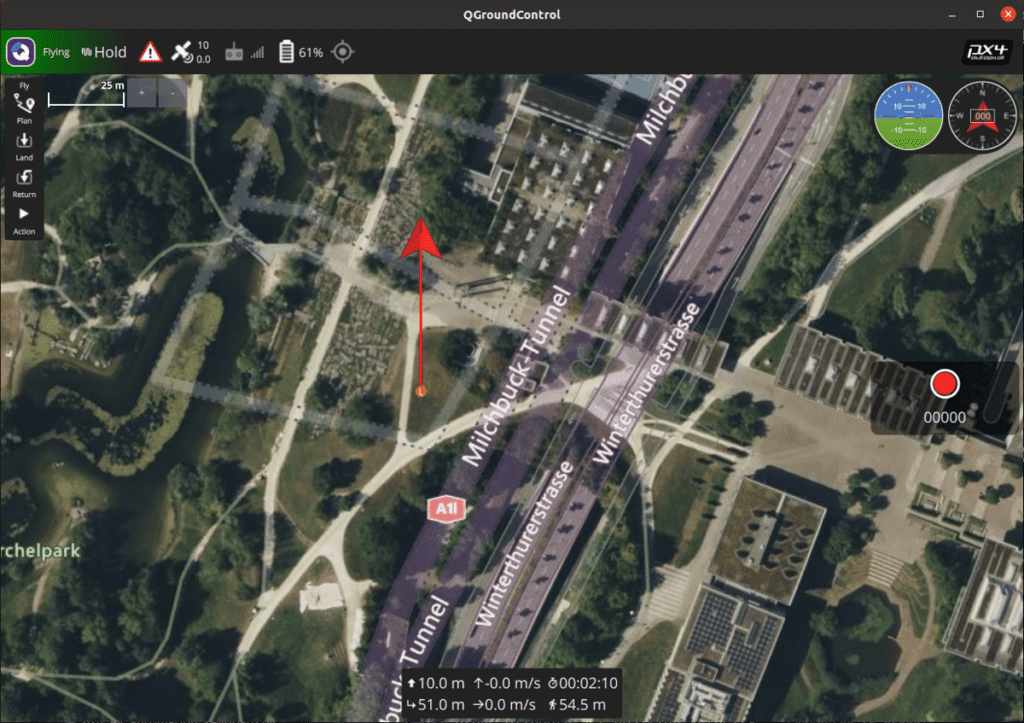
When you execute this code, the drone receives a position command for 10m altitude (-10.0) along with a feed-forward command to preemptively generate an upward speed of 1.0m/s (-1.0). Thanks to this, it kicks off the ground and ascends much more agilely.
④ Forward Flight (Position Movement + Forward Feed-Forward Velocity)
print("-- Go 50m North, 0m East, -10m Down (Apply FF velocity)")
await drone.offboard.set_position_velocity_ned(
    PositionNedYaw(50.0, 0.0, -10.0, 0.0), # Target Position: 50m North
    VelocityNedYaw(1.0, 0.0, 0.0, 0.0)     # Target Velocity (FF): 1.0m/s North
)
await asyncio.sleep(20)
The drone flies 50 meters North while maintaining its 10m altitude. Because a feed-forward velocity of 1.0m/s (VelocityNedYaw) is added in the North direction, the vehicle accelerates smoothly toward the target without hesitation.
3. Complete Practical Example Code (offboard_position_velocity_ned.py)
Here is the complete code encompassing everything we’ve discussed so far. I encourage you to create a script in your Ubuntu development environment and feel the difference for yourself.
#!/usr/bin/env python3
import asyncio
from mavsdk import System
from mavsdk.offboard import (PositionNedYaw, VelocityNedYaw, OffboardError)

async def run():
    drone = System()
    await drone.connect(system_address="udp://:14540")

    print("Waiting for drone to connect...")
    async for state in drone.core.connection_state():
        if state.is_connected:
            print("-- Connected to drone!")
            break

    print("Waiting for drone to have a global position estimate...")
    async for health in drone.telemetry.health():
        if health.is_global_position_ok and health.is_home_position_ok:
            print("-- Global position estimate OK")
            break

    print("-- Arming")
    await drone.action.arm()

    print("-- Setting initial setpoint (EKF origin initialization)")
    await drone.offboard.set_position_ned(PositionNedYaw(0.0, 0.0, 0.0, 0.0))

    print("-- Starting offboard")
    try:
        await drone.offboard.start()
    except OffboardError as error:
        print(f"Starting offboard mode failed with error code: {error._result.result}")
        print("-- Disarming")
        await drone.action.disarm()
        return

    # Define an asynchronous function for velocity telemetry output
    async def print_z_velocity(drone):
        async for odom in drone.telemetry.position_velocity_ned():
            print(f"North Vel: {odom.velocity.north_m_s:.2f} | Down Vel: {odom.velocity.down_m_s:.2f}")

    # Start velocity monitoring as a background task
    asyncio.ensure_future(print_z_velocity(drone))

    # 1. Ascend to 10m altitude (Apply Feed-Forward -1.0m/s)
    print("-- Go 0m North, 0m East, -10m Down (Feed-Forward applied)")
    await drone.offboard.set_position_velocity_ned(
        PositionNedYaw(0.0, 0.0, -10.0, 0.0),
        VelocityNedYaw(0.0, 0.0, -1.0, 0.0))
    await asyncio.sleep(10)

    # 2. Advance 50m North (Apply Feed-Forward 1.0m/s)
    print("-- Go 50m North, 0m East, -10m Down (Feed-Forward applied)")
    await drone.offboard.set_position_velocity_ned(
        PositionNedYaw(50.0, 0.0, -10.0, 0.0),
        VelocityNedYaw(1.0, 0.0, 0.0, 0.0))
    await asyncio.sleep(20)

    print("-- Landing")
    await drone.action.land()

    print("-- Stopping offboard")
    try:
        await drone.offboard.stop()
    except OffboardError as error:
        print(f"Stopping offboard mode failed with error code: {error._result.result}")

if __name__ == "__main__":
    # Run the asyncio loop
    asyncio.run(run())
4. Pro-Tips and Cautions for Researchers
While feed-forward simultaneous control might seem like a magic wand, there are crucial caveats that researchers must keep in mind.
“You must thoroughly understand your system’s dynamic characteristics.” To use feed-forward control effectively, you must have a solid grasp of your drone’s physical properties (weight, maximum thrust, inertia, etc.). If the distance to the target is short, but you input an absurdly high feed-forward velocity, the vehicle won’t be able to brake in time. This will result in a massive overshoot, ultimately degrading performance rather than improving it.
Therefore, when applying feed-forward values for your thesis or research design, you must carefully tune the gains based on the dynamic model of your system. Well-tuned feed-forward control will elevate your autonomous flight algorithms to an entirely new level of sophistication.
Wrapping Up
In this Part 10, we have explored in detail the Feed-Forward Simultaneous Control technique, which maximizes responsiveness and precision—the very essence of autonomous flight control. I applaud your dedication through this Offboard series, mastering position control, velocity control, and finally, this advanced fused control.
Now, we are equipped with the perfect theoretical foundation to move the drone however we desire through code! In our next post, [Part 11], we will synthesize all the knowledge we’ve accumulated to develop our most exciting practical project yet: a ‘Manual Drone Control Program via Keyboard Inputs’ in Python.
Get ready for some thrilling practical coding, where you will directly pilot the drone using directional or WASD keyboard inputs, just like playing a PC game. If you encounter any errors or have questions while executing the code, please feel free to leave a comment anytime. QUAD Drone Lab sincerely cheers for your successful research and perfect flights! Thank you.

Author: maponarooo, CEO of QUAD Drone Lab
Date: March 5, 2026
![[PX4 Tuning Series 7] Land Detector Configuration: The Essential Guide for a Perfect Flight Conclusion](https://quad-drone-lab.co.kr/wp-content/uploads/2026/03/Drone-Ground-Contact-Landing-Logic-768x429.png)
![[하이브리드 항법 시스템: 제5편] [구현-1단계] 순항 단계: 고전적 추측 항법, 풍향 추정, 그리고 Gazebo 바람 시뮬레이션 구현](https://quad-drone-lab.co.kr/wp-content/uploads/2026/05/Drone-Vector-Navigation-Crab-Angle-768x429.png)
![PX4 MAVSDK – C++ Programming [Part 3] Installing MAVSDK C++ and Setting Up the SITL Simulation Environment](https://quad-drone-lab.co.kr/wp-content/uploads/2026/03/0313_인포그래픽-768x419.jpg)
![[New Blog Series Introduction] Everything About Drone Batteries – From Basics to Next-Generation Technologies](https://quad-drone-lab.co.kr/wp-content/uploads/2026/04/Drone-Battery-Technology-Masterclass-768x1376.jpg)