PX4 MAVLink-Python Programming: 5-1. MAVLink 2 Message Signing
Hello, I am Aiden from the Marketing Team.
Today, I would like to introduce MAVLink 2 Message Signing within the context of PX4 MAVLink-Python programming. This content is the copyrighted intellectual property of QUAD Drone Lab; please refrain from unauthorized distribution.

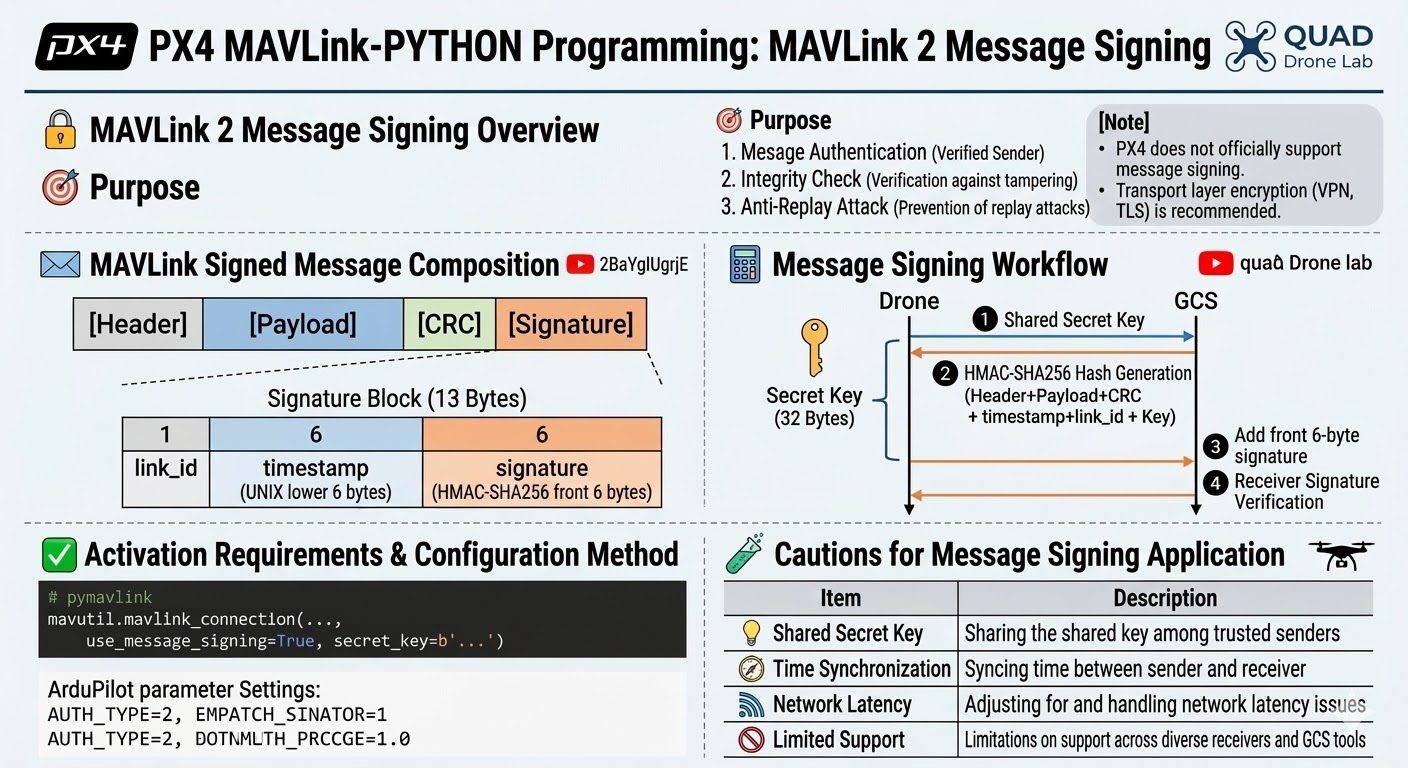
🔐 MAVLink 2 Message Signing Overview
🎯 PURPOSE
- Authentication: Verifying that the message genuinely originated from a trusted sender.
- Integrity: Ensuring the message has not been tampered with or modified.
- Replay Attack Prevention: Preventing the re-use of intercepted valid messages.
[NOTE]
As of now, PX4 does not officially support MAVLink 2 Message Signing. A Pull Request to add this feature was submitted in 2021 but has not yet been merged.
PX4 developers generally recommend securing the transport layer (e.g., VPN, TLS) as a more effective method for communication security.
Therefore, if you require message integrity and authentication, consider transport layer security or using a flight controller that supports signing, such as ArduPilot.
✉️ Structure of a Signed MAVLink Message
In MAVLink 2, a Signature Block is appended to the basic message format. The full packet is structured as follows:
[Header][Payload][CRC][Signature]Signature Block (13 Bytes)
| Bytes | Field Name | Description |
|---|---|---|
| 1 | link_id | ID to distinguish communication channels (1–255) |
| 6 | timestamp | Lower 6 bytes of UNIX time; prevents replay attacks |
| 6 | signature | The first 6 bytes of the hash generated via HMAC-SHA256 |
Overall, this results in an additional overhead of 13 bytes.
🧮 How Does Message Signing Work?
- Both parties (Drone ↔ GCS) must share the same
32-byte Secret Key. - When sending a message, an HMAC-SHA256 hash is generated based on:
- The entire message (
Header + Payload + CRC) timestamp+link_id- The shared
Secret Key
3. The first 6 bytes of this hash are appended to the end of the message as a signature.
4. The receiver calculates the hash in the same way to verify the signature.
✅ Activation and Configuration
1. Enabling Signing in the MAVLink Library (pymavlink)
Python pymavlink :
from pymavlink import mavutilㅁ<br><br>the_connection = mavutil.mavlink_connection(<br> 'udp:127.0.0.1:14550',<br> source_system=255,<br> use_message_signing=True,<br> secret_key=b'\x01\x02...32바이트 키...',<br> link_id=1<br>)2. Enabling MAVLink Signing in Firmware
- PX4: Currently not supported (as of April 2025/2026).
- ArduPilot: Supported via the following parameters:
AUTH_TYPE = 2→ Enable MAVLink SigningAUTH_KEY→ Shared Secret KeyAUTH_OPTIONS→ Set whether signing is optional or required
🔁 How is a Replay Attack Prevented?
- The
timestampis included in every signed message - The receiver rejects any message with a timestamp older than the most recently received one
- This prevents attackers from re-sending previously captured valid command messages.
🧪 Important Considerations
| Item | Description |
| Secret Key Sharing | Both sender and receiver must use the exact same 32-byte key. |
| Time Sync | A degree of time synchronization is required for timestamp validation. |
| Network Latency | High latency may cause “false negatives” during timestamp checks. |
| Limited Support | Some GCS tools do not yet support MAVLink signing (e.g., QGroundControl). |
YOUTUBE Class
This concludes our look at Ensuring MAVLink Reliability: MAVLink 2 Message Signing. In our next post, we will cover [Reference] What is HMAC-SHA256?

Author: Aiden, Marketing Team @ QUAD Drone Lab
Date: March 6, 2026
![[ROS2 Mastery Part 5] ROS2 Topic Programming (2) – Receiving Location Information with a Subscriber](https://quad-drone-lab.co.kr/wp-content/uploads/2026/05/0516_인포그래피-768x429.jpg)
![PX4 MAVSDK – C++ Programming [5편] 시스템 정보 쿼리 및 원격 측정(Telemetry) 활용](https://quad-drone-lab.co.kr/wp-content/uploads/2026/03/0315_인포그래피-768x512.png)
![[ROS2 Mastery 11편] 움직이는 로봇의 TF2 브로드캐스터 및 리스너(Listener) 구현 완벽 가이드](https://quad-drone-lab.co.kr/wp-content/uploads/2026/06/0613_인포그래픽1-768x512.png)