
PX4 MAVSDK – C++ Programming [Episode 7] Moving to a Specific Location (goto_location) and Understanding the Haversine Formula
Hello! This is Aiden from the Marketing Team. In our previous post (Part 6), we mastered the basic control loop—arming the drone using the Action API, taking off into the sky, and landing safely back on the ground.
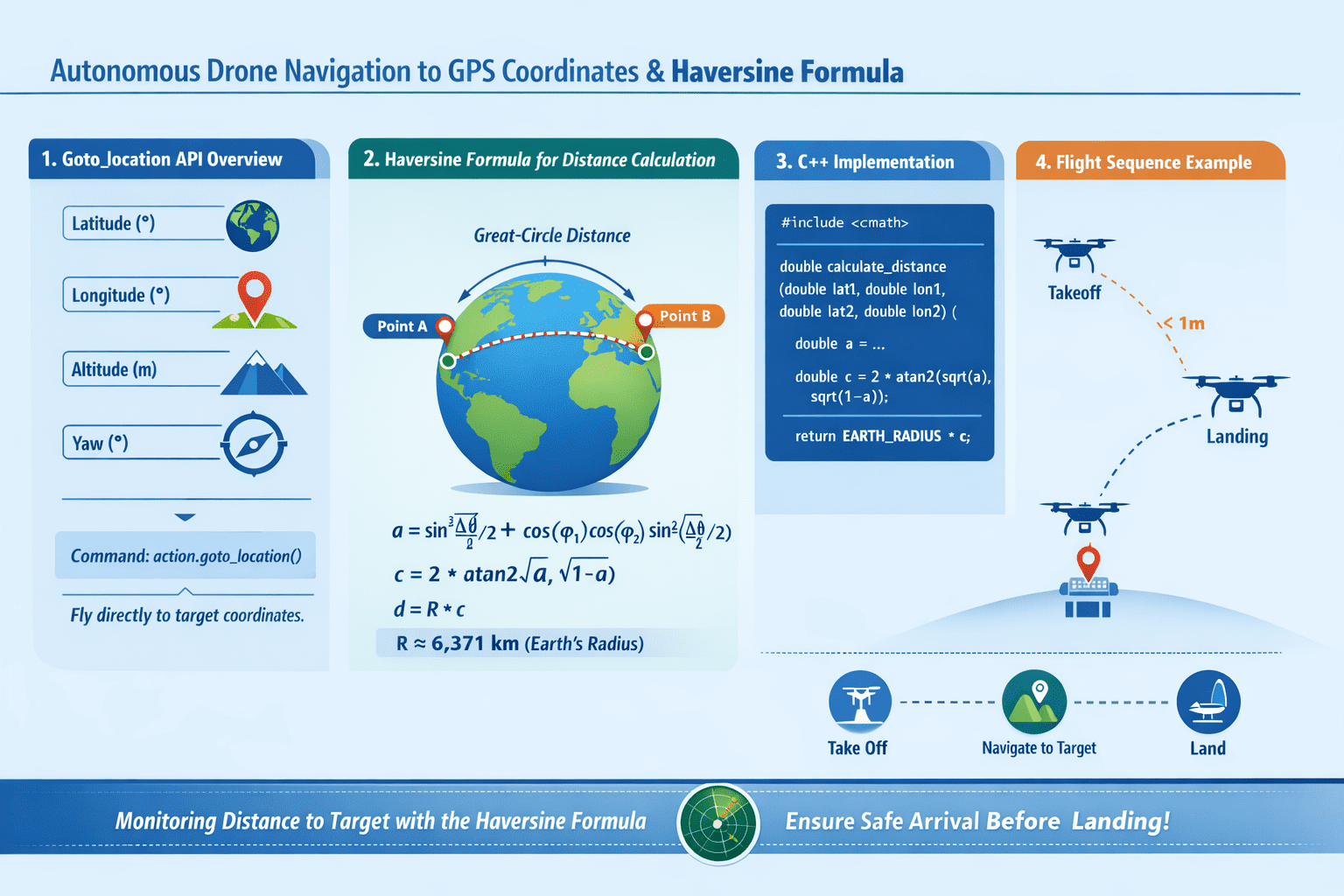
However, a robot that only moves up and down in one spot can hardly be called a “true” autonomous flying robot. In Part 7, we will finally learn how to make a drone fly itself to specific GPS coordinates (latitude, longitude) on Earth using the goto_location command. Furthermore, for the robotics researchers among us, we will dive deep into the mathematical principles and C++ implementation of the Haversine Formula, which is essential for calculating the shortest distance between two points on a spherical coordinate system.
Moving to a Specific Location: Overview of the goto_location API
The MAVSDK Action plugin provides the goto_location() method, which moves the aircraft to specific global coordinates. This command instructs the autopilot to fly the drone in a straight line from its current position to the target point.
When calling this function, you must pass the following four parameters:
- Latitude: The global latitude of the target point (Unit: Degrees)
- Longitude: The global longitude of the target point (Unit: Degrees)
- Absolute Altitude: The target altitude based on Above Mean Sea Level (AMSL) (Unit: Meters)
- Yaw: The compass heading the front of the aircraft (nose) should face during movement (Unit: Degrees, North is 0°)
[Note on Asynchronicity of Command Acceptance and Execution]
As emphasized in Part 6, a Success return from goto_location() simply means the aircraft has accepted the command with the intent to fly to the target; it does not mean it has arrived there yet. Therefore, after issuing the command, you must use the Telemetry plugin to monitor the distance between the current and target positions to determine arrival.
So, how do we calculate the distance between the current and target locations? This is where mathematical expertise comes into play.
How Far Will the Drone Fly?: The Haversine Formula
If a drone were flying on a perfectly flat 2D plane, we could easily find the Euclidean distance using the Pythagorean theorem ($d = \sqrt{\Delta x^2 + \Delta y^2}$). However, the Earth is a sphere.
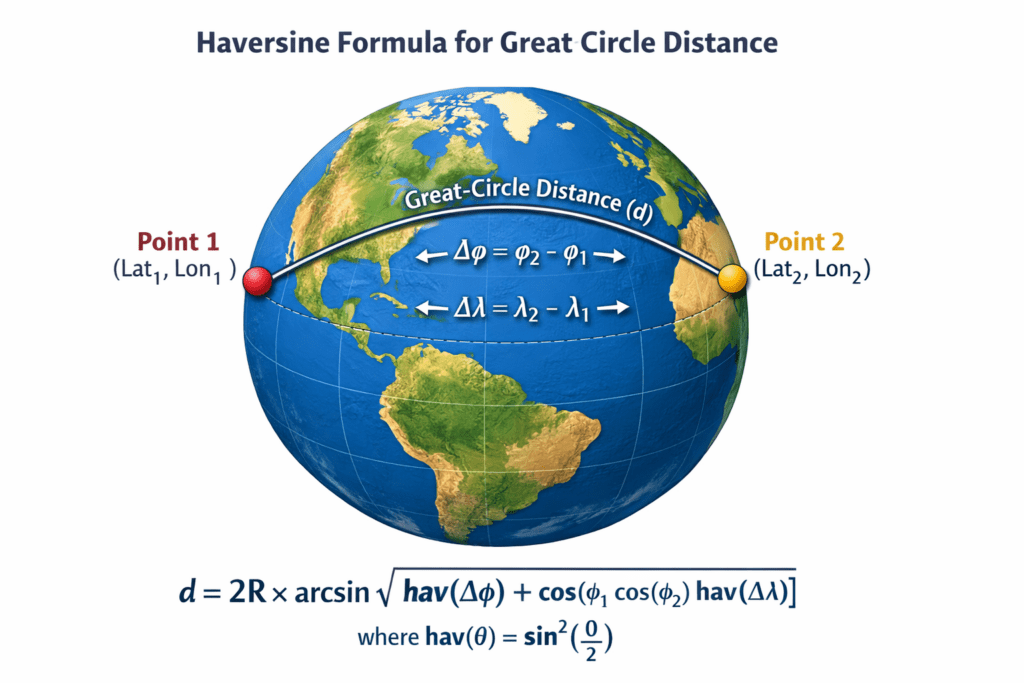
To calculate the actual shortest distance (Great-circle distance) between two points in a GPS system using spherical coordinates (latitude and longitude), we must use spherical trigonometry. The traditional and robust formula used for this is the Haversine Formula.
Mathematical Understanding (Deep Dive for Researchers)
The haversine function is defined as: $hav(\theta) = \sin^2\left(\frac{\theta}{2}\right)$
Starting from the spherical law of cosines and applying this haversine function (using half-angle identities), we can derive a distance formula that is numerically stable.
The parameter $a$, used to find the central angle $c$, is defined as:
$$a = \sin^2\left(\frac{\Delta\phi}{2}\right) + \cos\phi_1 \cos\phi_2 \sin^2\left(\frac{\Delta\lambda}{2}\right)$$
(Where $\phi$ is latitude, $\lambda$ is longitude, and $\Delta$ represents the difference between the two points.)
Ultimately, the central angle $c$ is derived as $c = 2 \cdot \arcsin(\sqrt{a})$, and the actual surface distance $d$ is obtained by multiplying by the Earth’s radius $R$: $d = R \cdot c$.
This formula prevents “loss of significance” in floating-point arithmetic even when the distance between two points is very small, ensuring high precision. It is an essential formula to master for developing precise autonomous flight algorithms.
Implementing the Haversine Formula in C++
Let’s implement the mathematical formula described above using modern C++ with the <cmath> standard library.
Note that when calculating the central angle $c$ in programming, using $c = 2 \cdot \operatorname{atan2}(\sqrt{a}, \sqrt{1-a})$ is much more numerically stable for extreme cases like antipodal points or very close points compared to arcsin.
[C++ Utility Function for Haversine Distance]
#include <cmath>
#include <numbers> // C++20 이상의 std::numbers::pi_v 사용

// 각도를 라디안으로 변환하는 헬퍼 함수
constexpr double deg_to_rad(double deg) {
    // M_PI는 비표준이므로, <numbers>의 pi_v를 사용하거나 상수를 직접 정의하는 것을 권장합니다 [5].
    return deg * (std::numbers::pi_v<double> / 180.0);
}

// 두 GPS 좌표 간의 거리를 미터(m) 단위로 반환하는 하버사인 함수 [6]
double calculate_distance(double lat1, double lon1, double lat2, double lon2) {
    // 평균 지구 반지름 세팅 (단위: 미터) [6]
    // 더 정밀한 계산을 원할 경우 WGS-84 적도반경(6378137.0)을 사용할 수도 있습니다 [6].
    const double EARTH_RADIUS_M = 6371000.0;

    // 1. 위도와 경도 차이를 라디안으로 변환 [5]
    double d_lat = deg_to_rad(lat2 - lat1);
    double d_lon = deg_to_rad(lon2 - lon1);

    // 2. 입력받은 위도도 라디안으로 변환 [5]
    double rad_lat1 = deg_to_rad(lat1);
    double rad_lat2 = deg_to_rad(lat2);

    // 3. 매개변수 a 계산 (sin^2 형태를 사용하여 소수점 상실 방지) [5]
    double a = std::sin(d_lat / 2.0) * std::sin(d_lat / 2.0) +
               std::cos(rad_lat1) * std::cos(rad_lat2) *
               std::sin(d_lon / 2.0) * std::sin(d_lon / 2.0);

    // 4. 중심각 c 계산 (atan2를 사용하여 안정성 확보) [5]
    double c = 2.0 * std::atan2(std::sqrt(a), std::sqrt(1.0 - a));

    // 5. 최종 거리 반환 (R * c) [6]
    return EARTH_RADIUS_M * c;
}
Integrating the Example: Flying to a Target After Takeoff
Now, let’s integrate everything we’ve learned—Takeoff/Landing via Action, asynchronous Telemetry subscriptions, and distance calculation via the Haversine formula—into a complete autonomous movement sequence.
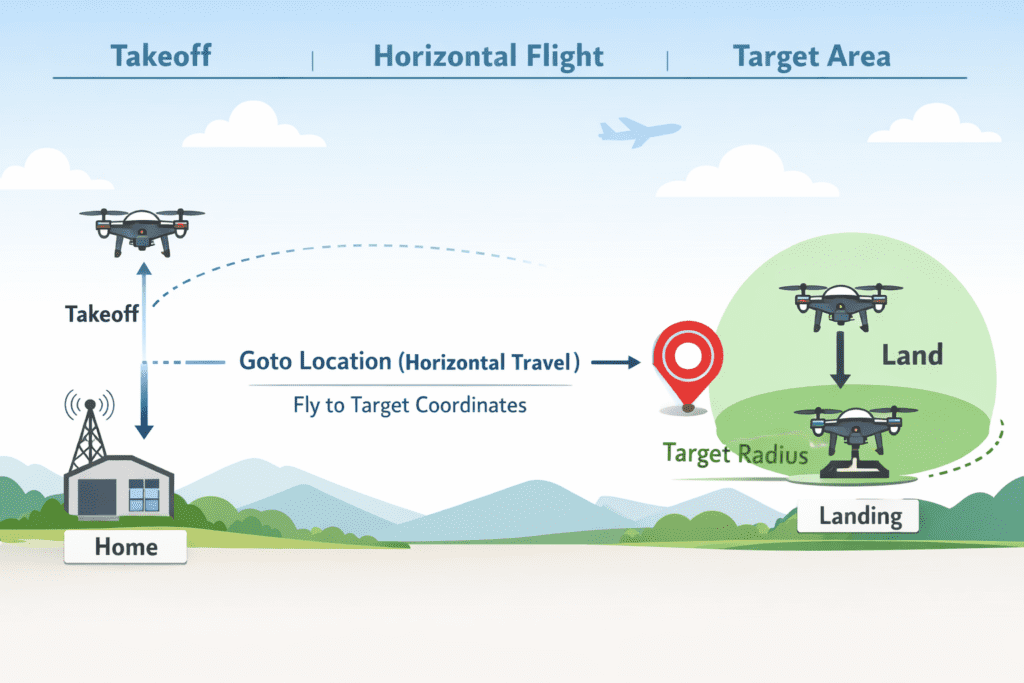
In this example, the drone will take off and move to an arbitrary point slightly north of its current position. When the distance to the target is within 1 meter, it will conclude the mission and land.
[Complete Code for Autonomous Positioning and Monitoring]
#include <iostream>
#include <thread>
#include <chrono>
#include <cmath>
#include <numbers>
#include <mavsdk/mavsdk.h>
#include <mavsdk/plugins/action/action.h>
#include <mavsdk/plugins/telemetry/telemetry.h>

using namespace mavsdk;
using std::chrono::seconds;
using std::this_thread::sleep_for;

// (Assume deg_to_rad and calculate_distance functions defined above are included here)

int main() {
    // 1. Initialization and SITL Connection
    Mavsdk mavsdk{Mavsdk::Configuration{ComponentType::GroundStation}};
    if (mavsdk.add_any_connection("udpin://0.0.0.0:14540") != ConnectionResult::Success) {
        std::cerr << "Connection failed\n"; return 1;
    }

    auto system = mavsdk.first_autopilot(3.0);
    if (!system) {
        std::cerr << "System detection timeout\n"; return 1;
    }

    auto action = Action{system.value()};
    auto telemetry = Telemetry{system.value()};

    // 2. Pre-flight check and Takeoff
    while (!telemetry.health_all_ok()) {
        std::cout << "Waiting for safety checks and GPS Lock...\n";
        sleep_for(seconds(1));
    }

    std::cout << "Arming and taking off...\n";
    action.arm();
    action.set_takeoff_altitude(5.0f);
    action.takeoff();

    // Wait for takeoff to stabilize
    sleep_for(seconds(8));

    // 3. Generate target point based on current position
    auto current_pos = telemetry.position();
    // Increase latitude slightly to target a point ~11m North
    double target_lat = current_pos.latitude_deg + 0.0001;
    double target_lon = current_pos.longitude_deg;
    // Maintain current absolute altitude (AMSL)
    double target_alt = current_pos.absolute_altitude_m;
    // Set yaw to face North (0 degrees) toward the target
    float target_yaw = 0.0f;

    // 4. Send goto_location command
    std::cout << "Sending goto_location command...\n";
    Action::Result goto_result = action.goto_location(target_lat, target_lon, target_alt, target_yaw);

    if (goto_result != Action::Result::Success) {
        std::cerr << "Movement command failed: " << goto_result << '\n';
        return 1;
    }

    // 5. Monitor target arrival (using Haversine formula)
    bool reached_target = false;
    while (!reached_target) {
        // Poll latest telemetry position
        auto pos = telemetry.position();

        // Calculate distance between current and target positions
        double distance_to_target = calculate_distance(
            pos.latitude_deg, pos.longitude_deg, target_lat, target_lon);

        std::cout << "Distance to target: " << distance_to_target << " meters\n";

        // Consider arrived if distance is less than 1 meter
        if (distance_to_target < 1.0) {
            std::cout << "Target reached!\n";
            reached_target = true;
        }

        sleep_for(seconds(1)); // Monitor at 1-second intervals
    }

    // 6. Land and Finish
    std::cout << "Attempting to land at current location.\n";
    action.land();

    while (telemetry.in_air()) {
        std::cout << "Descending...\n";
        sleep_for(seconds(1));
    }

    std::cout << "Landing complete! Terminating program.\n";
    return 0;
}In Part 7, we explored the goto_location() function to control a drone to specific GPS coordinates and learned the Haversine Formula, the core of spherical trigonometry for precise distance calculation.
Real-time monitoring of this distance to control “State Transitions” in autonomous flight is the fundamental logic used in actual research papers and commercial robotics projects.
Now that you’ve mastered moving to a single point, the next logical step is flying to multiple points in sequence, right? In [Part 8: Automating Mission Flights], we will cover how to upload dozens of waypoints and integrate camera trigger commands to build a complete autonomous mission.
YouTube Tutorial

Author: Aiden, Marketing Team, QUAD Drone Labs
Date: March 17, 2026
![PX4 MAVSDK – C++ Programming [9편] 정밀한 드론 제어: 오프보드(Offboard) 모드](https://quad-drone-lab.co.kr/wp-content/uploads/2026/03/0319_인포그래픽-768x429.jpg)
![PX4 MAVSDK – C++ Programming [Episode 11] Complete Comparison of MAVSDK vs MAVROS vs uXRCE-DDS](https://quad-drone-lab.co.kr/wp-content/uploads/2026/03/0322_인포그래피-768x512.png)
![PX4 MAVSDK – C++ Programming [Episode 6] Basic Flight Control using Action API](https://quad-drone-lab.co.kr/wp-content/uploads/2026/03/0316_인포그래피-768x512.png)
![[MAVSDK C++ Part 4] Building Your Own App: Project Setup and Drone Connection](https://quad-drone-lab.co.kr/wp-content/uploads/2026/03/0314_인포그래피-768x512.png)