

PX4 MAVLink-Python Programming: 7. MAV_CMD
Hello, I’m Aiden from the Marketing Team.
Today, I would like to introduce the 7th step of PX4 MAVLINK-PYTHON programming: MAV_CMD. This content is registered as the copyrighted property of our QUAD Drone Lab, so please refrain from unauthorized distribution.

MAV_CMD
OVERVIEW
MAV_CMD Messages is a list of control commands that can be issued to an aircraft in autonomous flight modes.
MAV_CMD primarily consists of COMMAND_INT and COMMAND_LONG types, which are used to send various commands to the drone.
COMMAND_INT Must be used when sending commands that include GPS coordinates or altitude information. This is because it allows for the specification of accurate coordinate frames for position and altitude values.
COMMAND_INT
| Field Name | Type | Values | Description |
| target_system | uint8_t | System ID | Target System ID |
| target_component | uint8_t | Component ID | Target Component ID (0: All components) |
| frame | uint8_t | MAV_FRAME | Coordinate system frame |
| command | uint16_t | MAV_CMD | Command ID (see MAV_CMD enum) |
| current | uint8_t | 0 | Not used (set to 0) |
| autocontinue | uint8_t | 0 | Not used (set to 0) |
| param1 | float | PARAM1 | Specific parameter 1 |
| param2 | float | PARAM2 | Specific parameter 2 |
| param3 | float | PARAM3 | Specific parameter 3 |
| param4 | float | PARAM4 | Specific parameter 4 |
| param5 | int32_t | Latitude | Local: x (m) * $10^4$, Global: Lat * $10^7$ |
| param6 | int32_t | Longitude | Local: y (m) * $10^4$, Global: Lon * $10^7$ |
| param7 | float | Altitude | z position: Global altitude in meters |
COMMAND_LONG should be used to send floating-point values in parameters 5 and 6. If these values are sent via COMMAND_INT, they will be truncated into integers.
COMMAND_LONG
| Field Name | Type | Values | Description |
|---|---|---|---|
| target_system | uint8_t | System ID | |
| target_component | uint8_t | Component ID (0 : every components) | |
| command | uint16_t | MAV_CMD | Command ID, see MAV_CMD enum |
| confirmation | uint8_t | 0: First transmission of this command. 1-255: Confirmation transmissions | |
| param1 | float | Parameter 1 (for the specific command). | |
| param2 | float | Parameter 2 (for the specific command). | |
| param3 | float | Parameter 3 (for the specific command). | |
| param4 | float | Parameter 4 (for the specific command). | |
| param5 | float | Parameter 5 (for the specific command). | |
| param6 | float | Parameter 6 (for the specific command). | |
| param7 | float | Parameter 7 (for the specific command). |
COMMAND_INT Sequence

Requests are transmitted from the Ground Control Station (GCS) encoded within a COMMAND_INT message. The drone processes the request and responds promptly with a COMMAND_ACK to indicate the result.
The result (MAV_RESULT) can indicate that the command was accepted
(COMMAND_ACK.result = MAV_RESULT_ACCEPTED), is accepted and in progress (MAV_RESULT_IN_PROGRESS), or was rejected with a specific reason code.
Notably, “MAV_RESULT_ACCEPTED” signifies that the command is valid and the flight stack will attempt to take action; it does not necessarily mean the command has been completed. Most commands return “MAV_RESULT_ACCEPTED” upon initial validation.
COMMAND_ACK.result_param2 may also include additional information regarding the reason for command denial, utilizing command-specific enums.
If an ACK is not received, the GCS retransmits the COMMAND_INT.
COMMAND_LONG Sequence
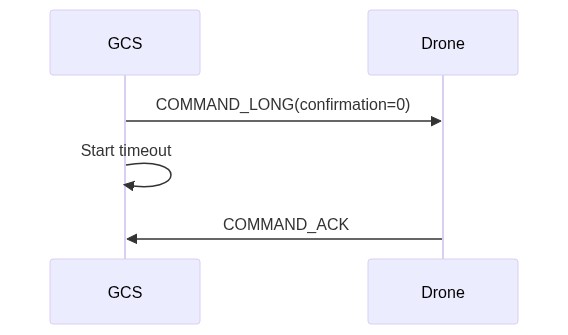
If a command is dropped, the sender must increment the confirmation field.
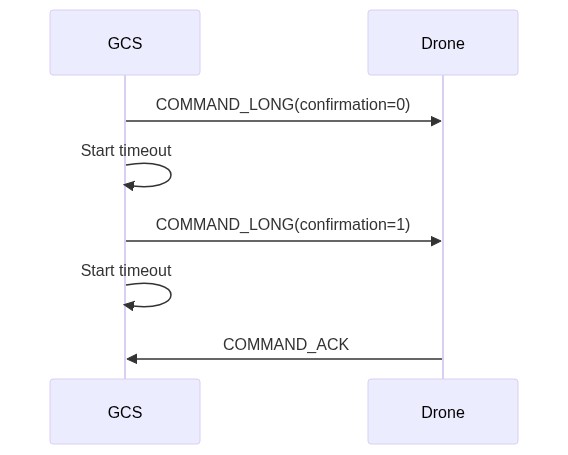
Long-Running Commands
Some commands take a long time to execute and cannot be completed immediately. In such cases, the drone transmits a COMMAND_ACK message with COMMAND_ACK.result = MAV_RESULT_IN_PROGRESS to report its status.
The execution progress is indicated in the COMMAND_ACK.progress field as a percentage from 0 to 100 (or 255 if progress information is not available). Once the task is finished, the drone must terminate the sequence by sending a final COMMAND_ACK that contains the ultimate result (e.g., MAV_RESULT_ACCEPTED, MAV_RESULT_FAILED, or MAV_RESULT_CANCELLED).
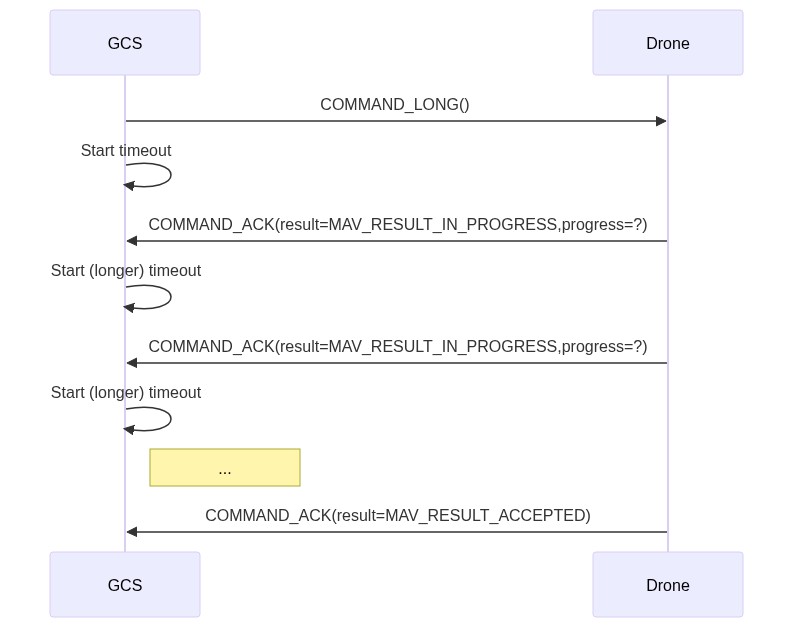
Long-running tasks can be canceled by sending a COMMAND_CANCEL message. The drone must then cancel the task and complete the sequence by sending a COMMAND_ACK (with COMMAND_ACK.result=MAV_RESULT_CANCELLED).
- If the cancellation is not successful, the drone may continue sending progress updates until the task is complete.
- If the sequence has already been finished or is in an idle state, the cancellation command will be ignored.
The frequency at which the progress message (MAV_RESULT_IN_PROGRESS) is emitted depends on the specific system.
If a timeout is triggered while waiting for a progress or completion update, the GCS must terminate the sequence (returning to an idle state) and notify the user as appropriate.
Only one instance of a specific long-running command can be executed at a time. To restart a long-running task, the existing command must be canceled first!
However, this protocol allows different types of long-running commands to be executed in parallel, provided that the state machine of the receiving flight stack supports it.
Result Verification
COMMAND_ACK ( #77 )
| Field Name | Type | Units | Values | Description |
|---|---|---|---|---|
| command | uint16_t | MAV_CMD | Command ID (of acknowledged command). | |
| result | uint8_t | MAV_RESULT | Result of command. | |
| progress ** | uint8_t | % | The progress percentage when result is MAV_RESULT_IN_PROGRESS. Values: [0-100], or UINT8_MAX if the progress is unknown. | |
| result_param2 ** | int32_t | Additional result information. Can be set with a command-specific enum containing command-specific error reasons for why the command might be denied. If used, the associated enum must be documented in the corresponding MAV_CMD (this enum should have a 0 value to indicate “unused” or “unknown”). | ||
| target_system ** | uint8_t | System ID of the target recipient. This is the ID of the system that sent the command for which this COMMAND_ACK is an acknowledgement. | ||
| target_component ** | uint8_t | Component ID of the target recipient. This is the ID of the system that sent the command for which this COMMAND_ACK is an acknowledgement. |
YOUTUBE Class
This completes our overview of MAV_CMD, a critical component for autonomous drone control. We hope this guide from QUAD Drone Lab helps you build more robust and reliable drone applications.
I will will return with more detailed practical applications and examples related to “Differences between PX4 ‘OFFBOARD’ and ArduPilot ‘GUIDED’ Modes“

Author: Aiden, Marketing Team at QUAD Drone Lab
Date: March 08, 2026
![PX4 MAVSDK – C++ Programming [7편] 특정 위치로 이동 (goto_location) 및 하버사인 공식의 이해](https://quad-drone-lab.co.kr/wp-content/uploads/2026/03/0317_인포-768x512.png)
![[Hybrid Navigation System: Part 7] [Implementation-Phase 3] Terminal Phase: YOLO-Based Precision Visual Servoing (IBVS) and Offboard Control Simulation](https://quad-drone-lab.co.kr/wp-content/uploads/2026/07/UAV_Visual_Servoing_Navigation_Guide-768x429.png)