PX4 MAVSDK – C++ Programming [Part 2] Core C++ Syntax for MAVSDK
Hello! I am Aiden from the QUAD Drone Lab marketing team. In our previous post, we explored the significance of MAVSDK in autonomous flying robot systems and its general architecture.
Before we dive into writing code to control drones, we need to touch upon our primary tool: C++. For students or researchers accustomed to scripting languages like Python, C++ might feel somewhat heavy and complex. However, since the MAVSDK core is written in the modern C++17 standard, and high-performance real-time control is essential in the drone field, C++ is a necessity, not an option.
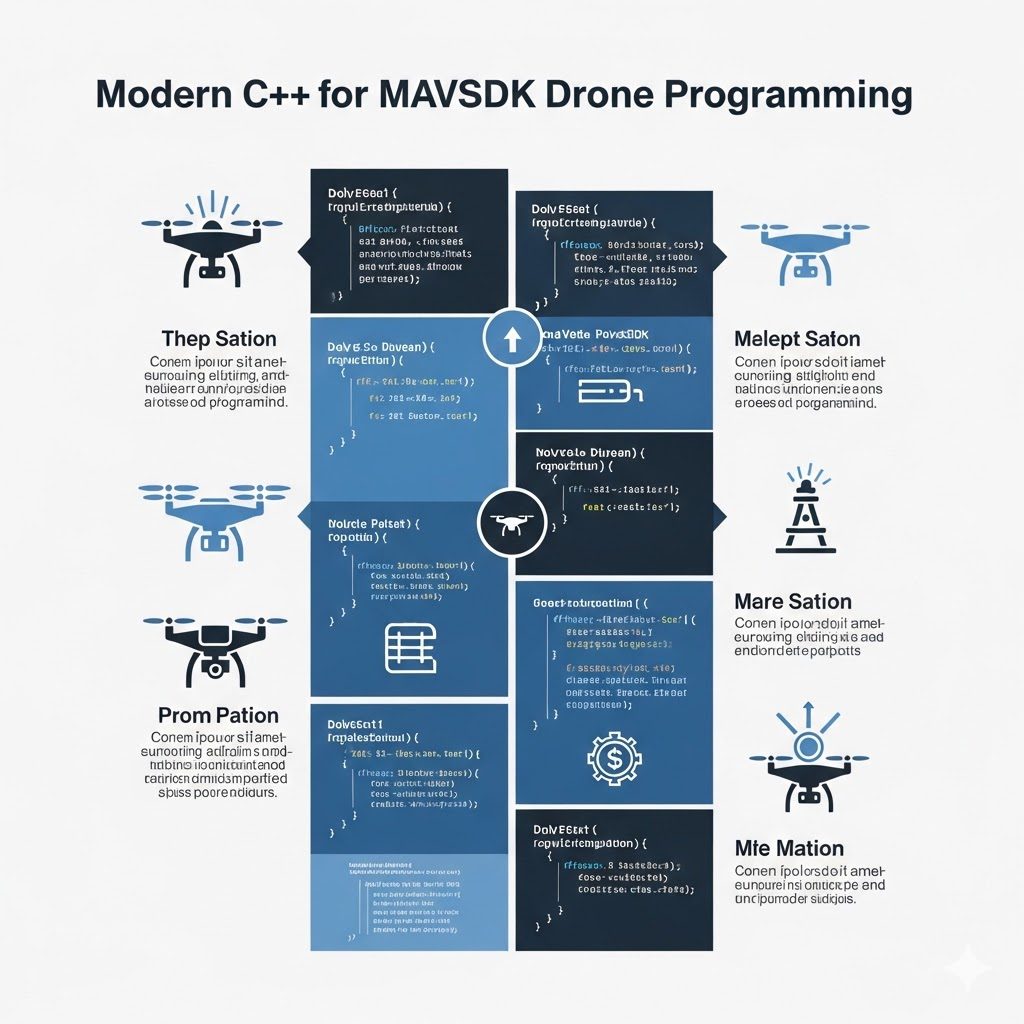
In this series, I will concisely summarize only the essential C++ syntax you must know to master MAVSDK.
1. Strengthening C++ Basics: I/O, Strings, and Dynamic Arrays
C++ elegantly resolves the inconveniences of C’s printf, scanf, and char arrays.
1) Intuitive Input/Output (std::cout, std::cin)
In C++, I/O is handled as a “Stream” using angle brackets (<<, >>). You don’t need to worry about format specifiers like %d or %s, making it very intuitive.
#include <iostream>
#include <string>

int main() {
    std::string name;
    std::cout << "Enter the drone's name: ";
    std::cin >> name; // Receive user input
    std::cout << "Connected Drone: " << name << std::endl; // Output and newline
    return 0;
}std::endlserves to insert a newline and flush the output buffer simultaneously.
2) The Standard for Strings: std::string
In C, handling strings required pre-defining array sizes and using cumbersome functions like strcat() or strlen(). C++’s std::string automatically adjusts its size and allows you to concatenate strings easily using the + operator. This is extremely useful when handling drone connection URLs (e.g., "udpin://0.0.0.0:14540").
3) The Ultimate Dynamic Array: std::vector
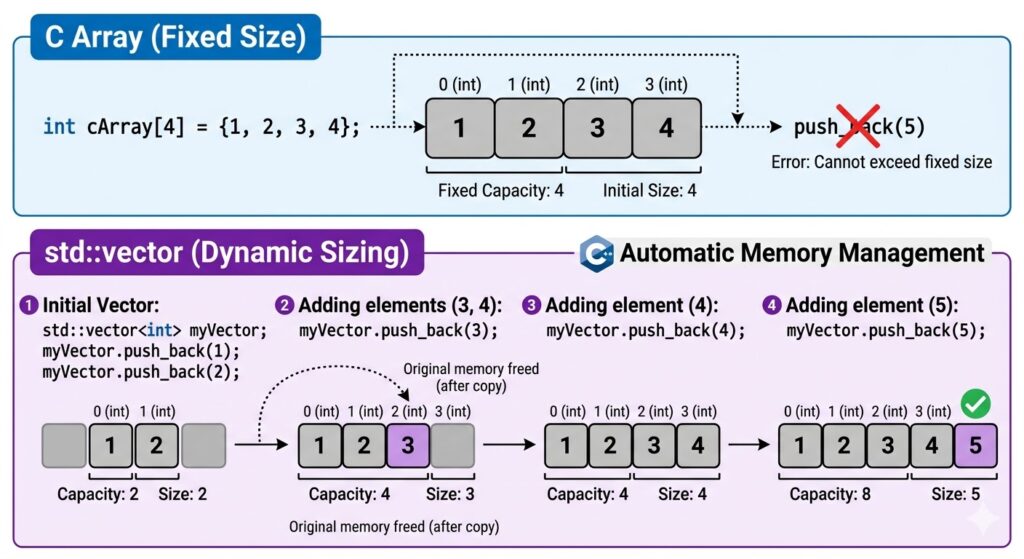
When assigning multiple waypoint missions to a drone, the number of waypoints varies per flight. Fixed arrays in C (int arr[10];) have limitations here. C++’s std::vector is a dynamic array that resizes itself automatically.
#include <vector>
#include <iostream>

int main() {
    std::vector<int> waypoints; // Create a dynamic array with size 0
    waypoints.push_back(100);   // Add 100 to the end
    waypoints.push_back(200);   // Add 200 to the end

    // Range-based for loop (extracting elements one by one)
    for (int wp : waypoints) {
        std::cout << "Waypoint Altitude: " << wp << "m\n";
    }
    std::cout << "Total Waypoints: " << waypoints.size() << "\n"; // Outputs 2
    return 0;
}In the MAVSDK Mission plugin, std::vector<Mission::MissionItem> is used extensively to hold numerous mission points.
2. Namespaces, OOP, and File Partitioning
1) Preventing Name Conflicts: Namespaces
The std:: you’ve been seeing is a namespace. In large projects with many developers, function or variable names often overlap. Namespaces prevent this by dividing the “territory.”
std::is the namespace for the C++ Standard Library.- All MAVSDK functions are contained within the
mavsdk::namespace.
2) Classes and Object-Oriented Programming (OOP)
A class is a “blueprint” that bundles data (member variables) and functions (member methods). MAVSDK is a fully object-oriented library. For example, there is a System object (the drone) and separate Action objects for the behaviors that the drone can perform.
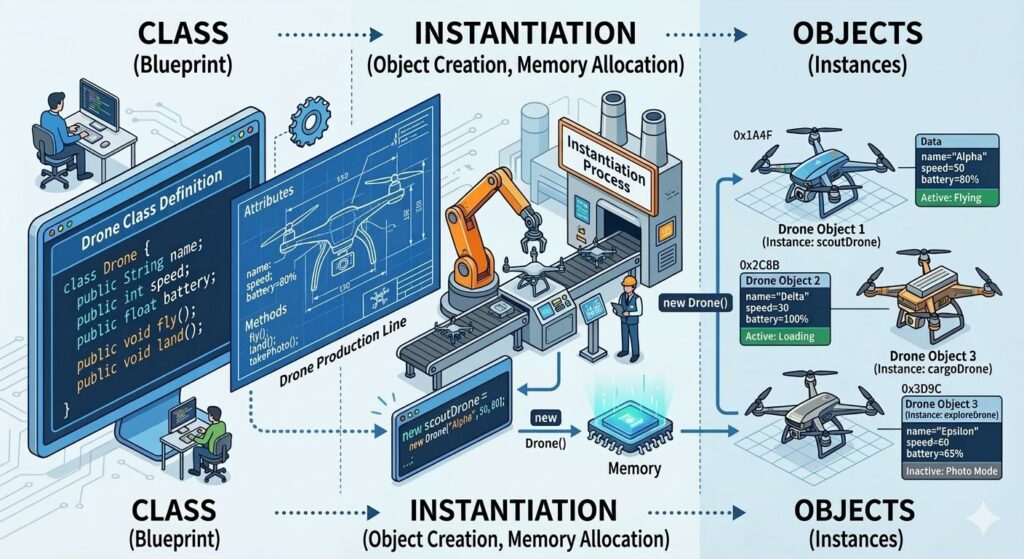
class Drone {
private:
    int battery; // Protected data (cannot be accessed directly from outside)

public:
    Drone() { battery = 100; } // Constructor: Runs automatically when object is created

    void fly() { // Member function
        if (battery > 10) {
            std::cout << "Starting flight.\n";
            battery -= 10;
        }
    }
};3) Header Files (.h) and Implementation Files (.cpp)
C++ projects typically split code into Declarations (.h) and Implementations (.cpp).
- .h file: Declares the class structure and function prototypes (the “manual”).
- .cpp file: Contains the actual logic of how functions operate.
3. The Core of Performance: Pointers (*) and References (&)
While these are often the “culprits” that make C++ difficult, they are vital for performance optimization in robotics.
1) Pointers vs. References
- Pointer (*): A variable that stores the memory ‘address’ of another variable. It can be empty (
nullptr). - Reference (&): Creates an ‘Alias’ for an existing variable. It must point to an object and cannot be empty. In C++, References are generally preferred as they are safer and easier to use.
2) Constant References (const &) – The Secret to Optimization!
Imagine receiving massive amounts of telemetry data from a drone. If you “copy” this huge data every time you pass it to a function, you waste CPU and memory.
// ❌ Pass by Value: The entire data is copied (Slow and heavy)
void printTelemetry(TelemetryData data) { ... }

// ✅ Pass by Constant Reference: Shares the original address without copying; cannot be modified (Fast and safe)
void printTelemetry(const TelemetryData& data) { ... }Code Reuse Magic: Templates and STL
1) Templates
Templates allow you to handle multiple data types with a single piece of code. This is the core of “Generic Programming.”
template <typename T>
T getMax(T a, T b) {
    return (a > b) ? a : b;
}

int main() {
    std::cout << getMax<int>(10, 20);       // Outputs 20
    std::cout << getMax<double>(3.14, 5.5); // Outputs 5.5
}2) STL (Standard Template Library)
std::vector is part of the STL. The STL consists of Containers (to hold data), Iterators (to traverse data), and Algorithms (to sort or search).
#include <vector>
#include <algorithm> // algorithm Header

std::vector<int> v = {5, 1, 3, 4, 2};
std::sort(v.begin(), v.end()); // Automatic ascending sort! [31]
5. MAVSDK Practical Tips: auto and Lambda Functions
These are two modern C++ (C++11 and later) features that appear almost constantly in MAVSDK code.
1) Let the Compiler Handle It: auto
auto is a “magic” keyword that allows the compiler to automatically deduce the data type of a variable. This is incredibly useful because MAVSDK functions often have return types that are exceptionally long and complex.
// ❌ Explicitly specifying complex types
mavsdk::ConnectionResult result = mavsdk.add_any_connection("udp://:14540");

// ✅ Cleaner code using 'auto'
auto result = mavsdk.add_any_connection("udp://:14540");The compiler looks at the value on the right side and automatically matches the type of result to ConnectionResult.
2) Anonymous One-time Functions: Lambda
Drone programming is a continuous series of asynchronous callback processing, such as “Let me know when the flight mode changes!” or “Execute this code when new GPS data arrives!” Defining a new function externally every time can be cumbersome. By using Lambda functions [](){}, you can define callback functions instantly within your code.
// A lambda function callback that executes instantly whenever the drone's position information is updated [36]telemetry.subscribe_position([](Telemetry::Position position) {
    std::cout << "현재 고도: " << position.relative_altitude_m << "m\n";
});[](Capture): Used to bring external variables into the scope of the lambda function.(Telemetry::Position position): The data passed into the callback (the parameters).{ ... }: The actual code block to be executed.
This lambda function pattern is the structure you will encounter most frequently when performing asynchronous control with MAVSDK, so please make sure to familiarize yourself with it!
So far, we have covered the essential C++ syntax required for MAVSDK programming: I/O, vector, classes, references (&), templates, as well as auto and lambda functions.
It is perfectly fine if these concepts don’t feel 100% clear right now. In the upcoming series, you will get to experience firsthand how these syntax elements work together organically as we write actual drone control code.
In our next installment, “MAVSDK C++ Installation and SITL Simulation Setup,” we will move beyond complex theory. We will prepare to launch a virtual drone (Gazebo SITL) on your own computer and connect it via code.
YOUTUBE Class

Author: Aiden, Marketing Team at QUAD Drone Lab
Date: March 09, 2026
![[ROS2 Mastery Part 11] Complete Guide to Implementing a TF2 Broadcaster and Listener for a Moving Robot](https://quad-drone-lab.co.kr/wp-content/uploads/2026/06/0613_인포그래픽1-768x512.png)
![📢 [Important] Announcement: YouTube Channel Membership Termination & Full Open-Source Transition of Research and Educational Content](https://quad-drone-lab.co.kr/wp-content/uploads/2026/06/공지-포스터_en-768x429.png)
![[Hybrid Navigation System: Special Edition] Survive GPS Jamming! A Complete Guide to “PX4 Dead-Reckoning Mode”](https://quad-drone-lab.co.kr/wp-content/uploads/2026/05/Resilient_Drone_Dead-Reckoning_Navigation-768x429.jpg)