
[Series Guide] Everything About PX4 MAVSDK C++ Programming
Hello to all undergraduate and graduate students, as well as researchers interested in autonomous flight robot research and drone software development.
While drones in the past were simple flying machines dependent on manual pilot operation, today’s Unmanned Aerial Vehicles (UAVs) have evolved into “high-level autonomous flight robots” that plan their own paths and avoid obstacles through complex algorithms. At the heart of this autonomy lies the PX4 Autopilot, the most widely used open-source flight stack in the world.
Furthermore, MAVSDK (MAVLink SDK) serves as a robust bridge connecting this flight controller with high-level AI and computer vision applications. In this series, we will dive deep into everything about PX4 MAVSDK C++ programming, step-by-step, so that anyone from beginners to advanced research applicants can follow along.

💡 Why C++ instead of Python?
When first starting drone programming, many people think of Python due to its accessibility.
However, once you enter the stage of serious robotics research and commercialization, you will realize the necessity of C++.
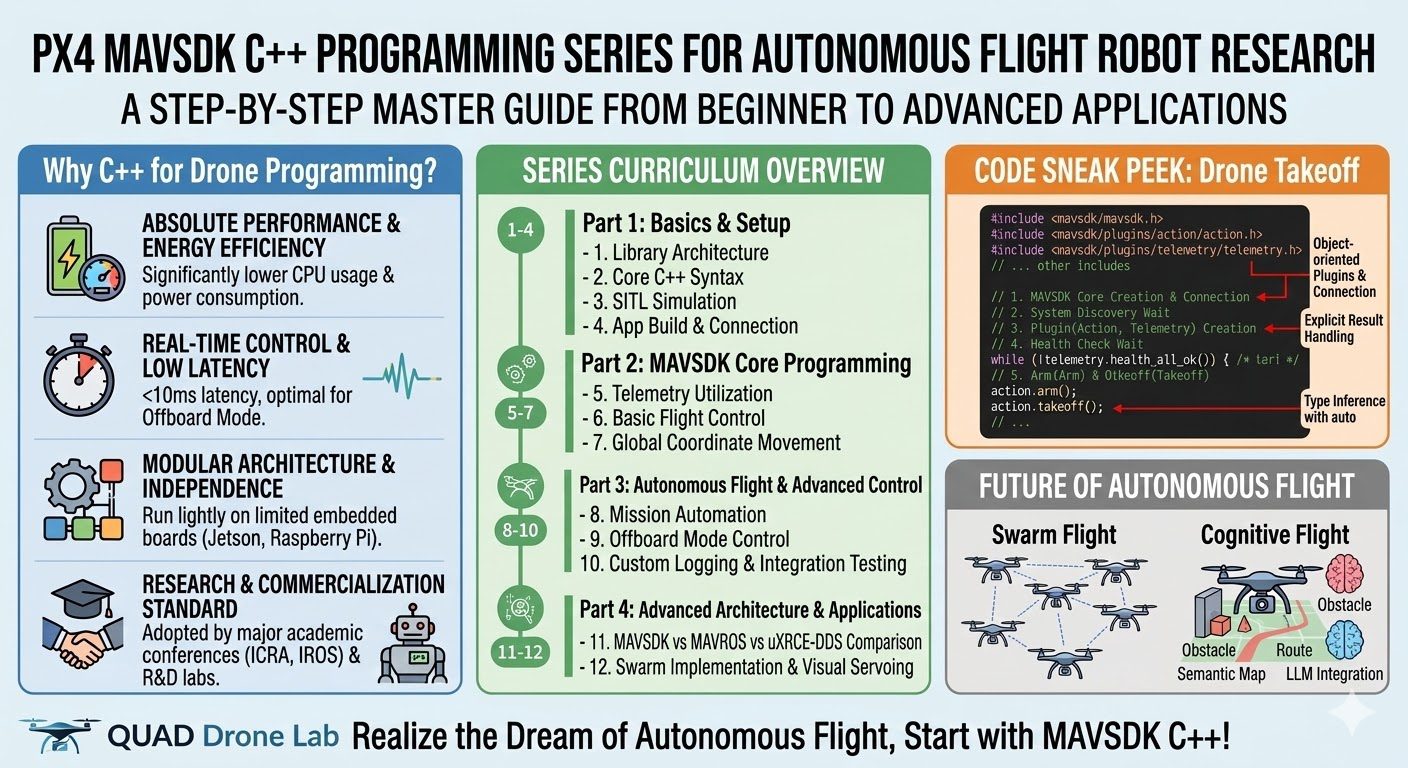
- Overwhelming Performance and Energy Efficiency: When implementing the same communication patterns, C++ based systems record significantly lower power consumption and CPU usage compared to Python. On drone platforms with limited battery capacity, this directly translates to extended flight time.
- Real-time Control and Low Latency: To directly control a craft in Offboard mode, velocity and attitude commands must be transmitted without interruption at speeds of dozens of times per second (10Hz ~ 50Hz). MAVSDK C++ optimizes internal thread pools and uses the lightweight MAVLink protocol directly to minimize latency to less than 10ms.
- Modular Architecture and Independence: Without the need to install the heavy ROS (Robot Operating System) ecosystem, MAVSDK C++ can create independent executables that run lightly on constrained embedded boards (e.g., NVIDIA Jetson, Raspberry Pi).

For these reasons, numerous academic research papers (ICRA, IROS, etc.) and industry R&D labs worldwide adopt MAVSDK C++ as the core tool for offboard control.
Curriculum Overview & Learning Guide
Based on the systematic curriculum of QUAD Drone Lab, this series consists of 4 parts and 12 core topics. Each step expands on previous concepts, so if you follow along steadily, you will soon find yourself commanding autonomous flight drones with ease.
Part 1: Basics & Environment Setup
Establish the essential background knowledge and a safe development environment for drone control programming.
- Ep. 1: MAVSDK C++ Library Overview & Architecture – Analyzing the principles of MAVLink communication and the modular structure based on Core and Plugins.
- Ep. 2: Mastering Core C++ Syntax for MAVSDK – Easily summarizing
std::vector,std::string, pointers/references, and modern C++ Lambda andautosyntax for those unfamiliar with C++. - Ep. 3: Installation & SITL Simulation Setup – Integrating Gazebo-based SITL (Software In The Loop) simulators to verify code in a virtual environment without the risk of damaging actual drones.
- Ep. 4: Building C++ Apps & Establishing Communication – Learning how to build projects using
CMakeLists.txtand monitoring UDP/TCP ports to establish communication with the drone system.
Part 2: MAVSDK Core Programming Guide
Covering how to check the drone’s telemetry status and issue basic flight commands.
- Ep. 5: System Info Queries & Telemetry Utilization – Hands-on practice receiving GPS coordinates, battery status, altitude, and flight modes in real-time using asynchronous callbacks.
- Ep. 6: Basic Flight Control with Action API – Implementing the flow from pre-flight checks to Arm, Takeoff, Land, and Disarm through code.
- Ep. 7: Moving to Specific Locations (goto_location) – Understanding the mathematical Haversine formula and moving the craft to designated global coordinates (latitude, longitude).
Part 3: Autonomous Flight & Advanced Control
Moving beyond simple movement to precision control for complex path following and external algorithm integration.
- Ep. 8: Automating Mission Flights – Uploading and executing complex missions including multiple waypoints, flight speeds, and gimbal actions using
MissionItemobjects. - Ep. 9: Precision Drone Control: Offboard Mode – Handling Offboard mode where a companion computer directly controls the craft’s velocity and attitude at 20Hz or higher. Gaining a deep understanding of the difference between NED (North-East-Down) and Body coordinate systems.
- Ep. 10: Custom Logging & Integration Testing (gtest) – Building real-time status monitoring using
LogDebug/LogErrand verification logic using the Google C++ Testing Framework.
Part 4: Advanced Architecture & Research Applications
Analyzing the latest technology trends used in actual papers for industry researchers and advanced developers.
- Ep. 11: MAVSDK vs MAVROS vs uXRCE-DDS Complete Comparison – Comparing the latest ROS 2-based DDS communication with MAVLink in terms of latency, bandwidth limits, and resource usage from an academic perspective.
- Ep. 12: Applying Latest Autonomous Flight Research Cases – Examining implementation architectures for Visual Servoing (avoiding obstacles using only RGB cameras without LiDAR), VFH algorithm integration, and decentralized Swarm flight.
Preview: Drone Takeoff Code
Before we officially begin, let’s look at a simple code snippet to see how intuitively MAVSDK C++ is designed.
#include <mavsdk/mavsdk.h>
#include <mavsdk/plugins/action/action.h>
#include <mavsdk/plugins/telemetry/telemetry.h>
#include <iostream>
#include <thread>
#include <chrono>

using namespace mavsdk;

int main(int argc, char** argv) {
    // 1. Create MAVSDK core object and connect (Simulator port 14540)
    Mavsdk mavsdk{Mavsdk::Configuration{ComponentType::GroundStation}};
    ConnectionResult connection_result = mavsdk.add_any_connection("udpin://0.0.0.0:14540");

    if (connection_result != ConnectionResult::Success) {
        std::cerr << "Connection failed!\n";
        return 1;
    }

    // 2. Wait for system discovery
    auto system = mavsdk.first_autopilot(3.0);
    if (!system) {
        std::cerr << "Drone not found.\n";
        return 1;
    }

    // 3. Create plugins (Action, Telemetry)
    auto action = Action{system.value()};
    auto telemetry = Telemetry{system.value()};

    // 4. Poll for readiness (GPS, Sensors, etc.)
    while (!telemetry.health_all_ok()) {
        std::cout << "Waiting for system to be ready...\n";
        std::this_thread::sleep_for(std::chrono::seconds(1));
    }

    // 5. Arm and Takeoff
    std::cout << "Arming motors...\n";
    action.arm();

    std::cout << "Taking off!\n";
    action.takeoff();

    // Wait for 10 seconds before exiting
    std::this_thread::sleep_for(std::chrono::seconds(10));
    return 0;
}As you can see, MAVSDK C++ allows you to control drones very intuitively through object-oriented plugins like Action or Telemetry without having to deal with complex internal communication packets (MAVLink messages).
The field of autonomous robotics is evolving rapidly. Beyond simple flight, the applications are endless—from Swarm flight where multiple units move while sharing data, to cognitive flight that automatically converts natural language commands into flight paths using Large Language Models (LLMs).
We hope this series serves as a reliable compass for your academic research, graduation projects, or corporate product development.
Please check out [Part 1: Episode 1 – PX4 MAVSDK C++ Library Overview & Architecture] to get started. Thank you.
YouTube Class

Author: Aiden, marketing team at QUAD Drone Lab
Date: March 10, 2026
![[ROS2 Mastery #10] TF2 Programming – The Complete Guide to Creating a Static Broadcaster](https://quad-drone-lab.co.kr/wp-content/uploads/2026/06/0610_인포그래픽-768x512.png)
![[ROS2 Mastery Chapter 8] The Essence of Robotics Math: The Ultimate Guide to the TF2 (Transform) System](https://quad-drone-lab.co.kr/wp-content/uploads/2026/05/0531_인포그래피-768x384.png)