
The Ultimate Guide to MAVSDK-Python Programming [Part 5]: Complete Understanding of Python ‘asyncio’ for MAVSDK Control
Hello and welcome back, university students and researchers dedicating yourselves to autonomous flight robotics and drone control algorithms! Welcome to the fifth installment of our blog series.
In Part 4, we explored the core classes of MAVSDK, such as System, Action, Telemetry, and Offboard, which are used to issue specific commands to the drone. While looking at the example codes, you probably noticed some unfamiliar Python keywords appearing repeatedly: async, await, and async for.
If you are only accustomed to writing traditional, sequential Python scripts, you might feel a significant barrier to entry here. However, MAVSDK-Python is a strictly asynchronous (asyncio-based) library where all major functions are written as async def and must be called using the await keyword. Therefore, you cannot properly control a drone without overcoming this hurdle.
In this [Part 5: Complete Understanding of Python ‘asyncio’ for MAVSDK Control], we will break down the concept of Python’s asynchronous programming—which programmers often find challenging—in a very friendly and easy-to-understand manner from the perspective of drone control.
1. Why is ‘asyncio’ essential for drone control?
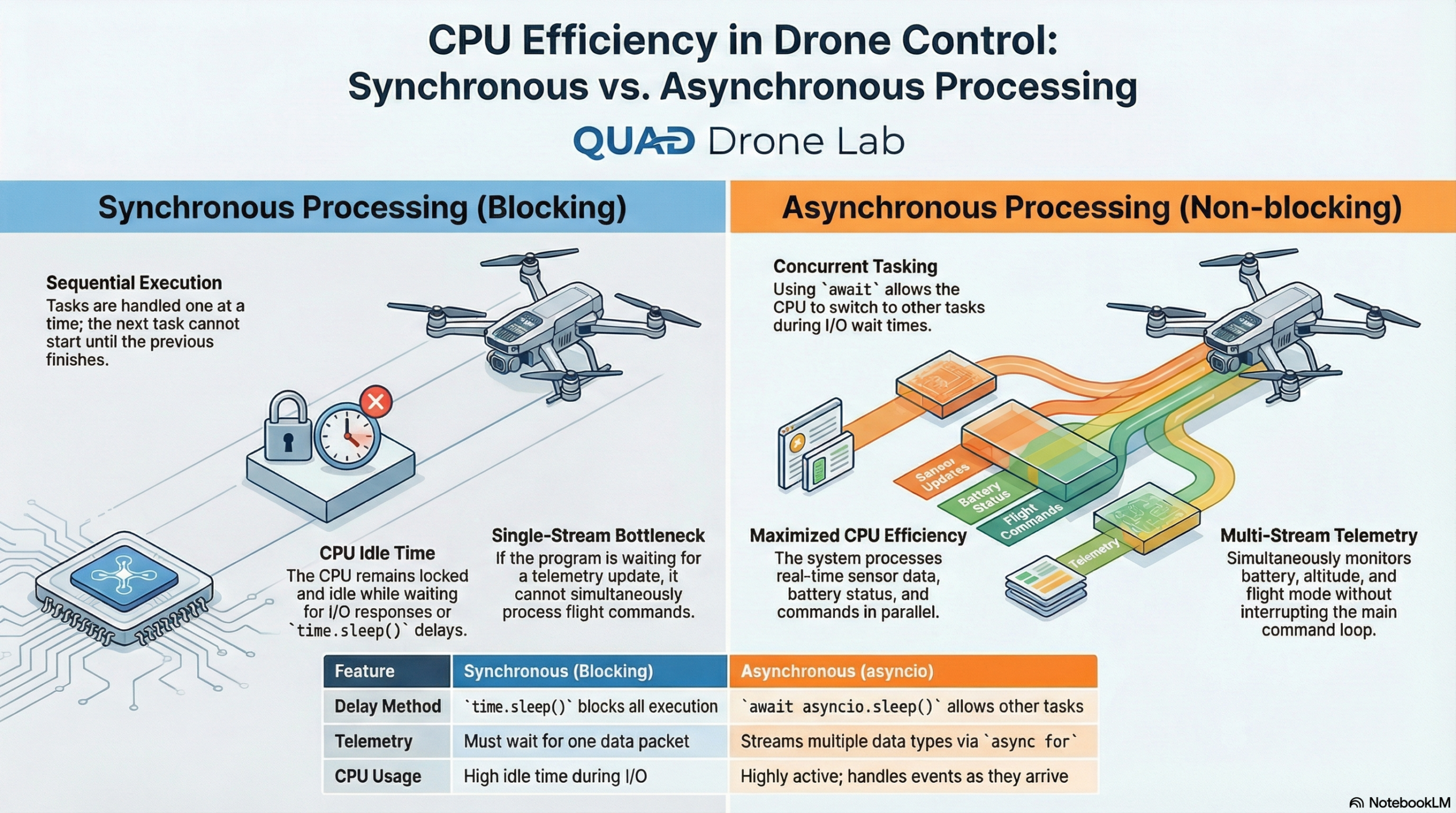
The typical Python code we write operates in a ‘Synchronous’ manner. This means the second line of code stops and waits (blocking) until the execution of the first line is completely finished.
But let’s think about the MAVLink communication environment between a drone and a ground station (or companion computer). Drone communication has the following characteristics:
- Real-time Communication: Sensor data such as altitude, GPS position, and battery status stream in continuously dozens of times per second.
- Event-driven: The system must react instantly to unpredictable events like “GPS signal acquired!”, “Battery low!”, or “Mission complete!”.
- I/O Delay: Because it is based on network or UDP/serial communication, there is inevitably a slight delay from sending a signal to receiving a response.
What would happen if we wrote this using synchronous code and paused the CPU with a function like time.sleep()? While the code is paused, the drone would fail to process new sensor data, potentially deviating from its trajectory or crashing because it missed an obstacle avoidance command.
To solve this, if we handle tasks asynchronously (non-blocking) using Python’s asyncio library, the CPU does not idle while waiting for a task to finish. Instead, it utilizes that spare time to process other sensor data, enabling highly efficient, seamless, and parallel drone control.
2. The 7 Core ‘asyncio’ Syntaxes You Must Know Before Writing a Paper
You don’t need to know every deep detail of asynchronous programming. Here is a summary of the 7 core syntaxes that researchers must master to control MAVSDK.
- ① async def (Defining an asynchronous function): You declare this by adding
asyncbefore a standarddef. When called, this function does not execute immediately but returns a ‘Coroutine’ object that can be executed asynchronously. - ② await (Waiting for an asynchronous function): When calling a function declared with
async def, you must prefix it with theawaitkeyword. This means, “I will wait for the result of this task, but while waiting, I will not block the CPU and will give other tasks a chance to run (Non-blocking)”. - ③ asyncio.run() (Program entry point): Used in standard synchronous Python code to execute the top-level asynchronous function (usually
main()orrun()), thereby starting the entire asynchronous event loop. - ④ asyncio.create_task() (Scheduling parallel execution): Registers an asynchronous function as a background task so that it runs simultaneously in parallel. This is critically used when monitoring multiple sensors at the same time.
- ⑤ async for (Asynchronous loop – Stream processing): Extremely useful when subscribing to and iteratively processing a continuous, real-time data stream, such as drone Telemetry information.
- ⑥ async with (Asynchronous context manager): Used for managing resources, such as opening and closing network sockets or files asynchronously.
- ⑦ asyncio.gather() (Wait for multiple tasks to finish): Used when you want to fire off multiple asynchronous functions at once and wait until all of them are completed.
3. Practical Example 1: The Importance of asyncio.sleep()
The absolute worst built-in Python function to use in an asynchronous environment is time.sleep(), because it literally blocks the CPU entirely. Instead, we must use await asyncio.sleep().
Let’s look at a simple takeoff and landing code combined with telemetry monitoring.
import asyncio
from mavsdk import System

# Asynchronous function to continuously print the drone's position in the background
async def print_position(drone):
    # Receive position info whenever it updates via async for
    async for position in drone.telemetry.position():
        print(f"Position: Lat {position.latitude_deg}, Lon {position.longitude_deg}")

async def run():
    drone = System()
    await drone.connect(system_address="udp://:14540")

    print("Arming...")
    await drone.action.arm()

    # Start executing the position printing task in parallel in the background
    task = asyncio.create_task(print_position(drone))

    print("Takeoff...")
    await drone.action.takeoff()

    # 💡 Core concept: Use asyncio.sleep(10) instead of time.sleep(10).
    # Because it doesn't block the CPU while waiting for 10 seconds,
    # the print_position task registered in the background can continue to print position data.
    await asyncio.sleep(10)

    print("Landing...")
    await drone.action.land()

    # Cancel the background task once the mission is over
    task.cancel()

if __name__ == "__main__":
    asyncio.run(run()) # Execute the entire loop
As you can see in this example, asyncio.sleep() is conceptually very similar to rate.sleep() for those who have used ROS (Robot Operating System). It provides breathing room so that other tasks (like printing the position) can be executed.
4. Practical Example 2: Monitoring Multiple Sensor Data Simultaneously (Parallel)
While conducting research, you will frequently need to simultaneously collect and log the vehicle’s battery voltage, current altitude, and flight mode changes. Since the async for syntax inherently loops and waits indefinitely, you can absolutely never collect these three simultaneously if you write synchronous code.
This is where utilizing asyncio.create_task() makes parallel processing magically possible. Let’s understand this completely by looking at the example below.
import asyncio
from mavsdk import System

# 1. Task to monitor the battery
async def monitor_battery(drone):
    async for battery in drone.telemetry.battery():
        print(f"[🔋 Battery] {battery.remaining_percent * 100:.1f}%")

# 2. Task to monitor altitude
async def monitor_altitude(drone):
    async for position in drone.telemetry.position():
        print(f"[📡 Altitude] {position.relative_altitude_m:.2f} m")

# 3. Task to monitor flight mode
async def monitor_flight_mode(drone):
    async for flight_mode in drone.telemetry.flight_mode():
        print(f"[✈️ Flight Mode] {flight_mode}")

async def run():
    drone = System()
    await drone.connect(system_address="udp://:14540") # Connect via SITL default port

    print("Waiting for drone connection...")
    async for state in drone.core.connection_state():
        if state.is_connected:
            print("✅ Drone connected!")
            break

    # 🚀 Create and start 3 monitoring tasks in parallel simultaneously
    # Now, these 3 functions will gather data in the background independently of the main logic.
    battery_task = asyncio.create_task(monitor_battery(drone))
    altitude_task = asyncio.create_task(monitor_altitude(drone))
    mode_task = asyncio.create_task(monitor_flight_mode(drone))

    # Main logic: Assume flying (or waiting) for 30 seconds
    await asyncio.sleep(30)

    # After 30 seconds, forcefully terminate the running monitoring tasks
    battery_task.cancel()
    altitude_task.cancel()
    mode_task.cancel()
    print("⏹️ Safely terminating monitoring.")

if __name__ == "__main__":
    asyncio.run(run())
If you run this code (in a SITL environment), you will see the battery, altitude, and flight mode information mixed and printed in real-time. This happens because each piece of sensor data is processed asynchronously and in parallel according to its receiving frequency (Hz).
[🔋 Battery] 99.3%
[📡 Altitude] 0.02 m
[✈️ Flight Mode] HOLD
[🔋 Battery] 99.2%
[📡 Altitude] 0.04 m
...
💡 Customization Tip for Researchers: If you want to save this data for paper analysis, simply adding Python’s file I/O code open('log.txt', 'w') to each monitoring function will transform it into an excellent Data Logger. Furthermore, you can easily expand the monitoring items by registering additional tasks like drone.telemetry.armed().
Wrapping Up
In this Part 5, we explored the most important backbone of autonomous flight programming: Asynchronous control based on Python’s asyncio. At first, async def and await might feel cumbersome and unfamiliar, but you should now fully understand why this approach is the optimal design for robot control that requires real-time communication with numerous sensors.
By just firmly grasping the concepts of asyncio.create_task() and await asyncio.sleep() learned today, the numerous MAVSDK example codes you will encounter in the future will become easily comprehensible at a glance.
Now you know the drone’s language (Classes) and have mastered how to converse with it (Asynchronous Programming)! In our next post, [Part 6: Analyzing MAVSDK-Python Basic Sample Programs], we will analyze the official sample codes provided by the Dronecode Foundation and take time to apply everything we’ve learned so far into actual research scenarios for comprehensive autonomous flight.
If you encounter any confusing syntax while following along, please feel free to ask questions in the comments anytime. I wish all you researchers successful coding. Thank you!
YouTube Class

Author: maponarooo, CEO of QUAD Drone Lab
Date: March 3, 2026
![PX4 MAVSDK – C++ Programming 제 [2편] MAVSDK 활용을 위한 C++ 핵심 문법](https://quad-drone-lab.co.kr/wp-content/uploads/2026/03/0312_인포그래픽-768x768.jpg)

![PX4 MAVSDK – C++ Programming [Episode 7] Moving to a Specific Location (goto_location) and Understanding the Haversine Formula](https://quad-drone-lab.co.kr/wp-content/uploads/2026/03/0317_인포-768x512.png)
![PX4 MAVSDK – C++ Programming [10편] 사용자 정의 로깅 및 통합 테스트(gtest)](https://quad-drone-lab.co.kr/wp-content/uploads/2026/03/0320_인포그래피-768x419.jpg)