The Ultimate Guide to MAVSDK-Python Programming [Part 8]: OFFBOARD Position Control (Based on NED Frame)
Hello once again, university students and researchers dedicating yourselves to autonomous flight robotics and drone control algorithms! Welcome to the eighth installment of our MAVSDK-Python blog series.
In our last session, [Part 7], we built a solid theoretical foundation regarding the communication principles of ‘OFFBOARD Mode’—the absolute core of drone control—along with its three essential prerequisites and the coordinate systems used as directional references. Offboard mode is a powerful feature where a companion computer (an external device) injects control commands to the flight controller (FC) dozens of times per second to precisely maneuver the vehicle.
Now that we have the theory down, it is time to dive into actual practical coding. In this session, [Part 8: OFFBOARD Position Control (NED Frame)], we will deeply analyze the position control method using Local_Position_NED, which is the most fundamental aspect of Offboard mode, and go through its example code line by line.
Let’s take our first step into spatial autonomous flight!
1. Reviewing the NED Coordinate System and Understanding the PositionNedYaw Class
Before writing the code, let’s briefly recall the language we will use to issue commands to the vehicle: the NED Coordinate System. NED stands for North, East, Down, and it is a local coordinate system based on the Earth’s absolute cardinal directions.
In MAVSDK, we use a class called PositionNedYaw to command positional movements based on this NED coordinate system. This class takes a total of four parameters:
north_m: How many meters to move North relative to the starting point (or Home position)? (South is a negative value).east_m: How many meters to move East relative to the starting point? (West is a negative value).down_m: How many meters to move Down relative to the starting point?yaw_deg: Which direction should the vehicle’s Nose point? (0 degrees for North, 90 for East, 180 for South, 270 for West).
💡 [Crucial Warning for Researchers] The most frequent mistake happens with the down_m (altitude) parameter. In flight dynamics and aviation, the positive (+) direction of the Z-axis is traditionally set towards the ground (Down). Therefore, you must absolutely remember that to fly the vehicle up into the air, the altitude must be inputted as a negative (-) value. (For example, taking off to a 5m altitude is -5.0).
2. Step-by-Step Analysis of the Core Logic
Now, let’s tear down the execution flow and core logic of the offboard_position_ned.py sample script.
① EKF Origin Initialization (Initial Setpoint)
In Part 7, we learned that one of the absolute prerequisites for entering Offboard mode is that an initial setpoint must be continuously injected before switching modes.
print("-- Setting initial setpoint")
# You must initialize the EKF origin (0,0,0) before starting Offboard mode.
await drone.offboard.set_position_ned(PositionNedYaw(0.0, 0.0, 0.0, 0.0))
Through the code above, we transmit a stream to the flight controller setting the drone’s current location as North 0, East 0, Down 0, and the nose direction to 0 degrees (North). If you skip this initialization and call start() immediately, the drone will reject the command and throw an error.
② Starting Offboard Mode and Safety Failsafes
try:
    await drone.offboard.start()
except OffboardError as error:
    print(f"Starting offboard mode failed with error code: {error._result.result}")
    print("-- Disarming")
    await drone.action.disarm()
    return
When attempting to enter Offboard mode, the request can be rejected for various reasons (e.g., poor sensor data, weak GPS reception). Therefore, you must always use a try... except block to handle the OffboardError exception. If an error occurs and entry fails, the script should immediately perform a disarm() for the safety of the vehicle and terminate the program.
③ Takeoff (Altitude Increase) and Movement Logic
If you have successfully entered Offboard mode, you can now move the vehicle freely. Let’s lift the vehicle 5 meters up (takeoff) based on the Local coordinate frame.
print("-- Go 0m North, 0m East, -5m Down within local coordinate system")
await drone.offboard.set_position_ned(PositionNedYaw(0.0, 0.0, -5.0, 0.0))
await asyncio.sleep(10)
Notice that right after issuing the control command set_position_ned(), we call the asynchronous wait function await asyncio.sleep(10). It naturally takes time for the drone to physically spin its motors and ascend to the target altitude of 5 meters. Thus, the key is to provide a sufficient ‘sleep’ time for the vehicle to actually reach the target destination.
Next, let’s move the vehicle to specific coordinates and change its heading.
print("-- Go 5m North, 10m East, -5m Down within local coordinate system")
await drone.offboard.set_position_ned(PositionNedYaw(5.0, 10.0, -5.0, 90.0))
await asyncio.sleep(15)
With this single line of command, the drone will fly to a position 5m North and 10m East from the starting point, while simultaneously performing a smooth Yaw rotation so that the front of the vehicle faces East (90 degrees).
④ Stopping Offboard Mode and Considerations for Landing
When your flight experiment is over, you call await drone.offboard.stop() to terminate Offboard mode. However, you need to be aware of a significant technical caveat here. If you run this code in a non-GPS environment (like using indoor motion capture or vision sensors), the stop() command may return a COMMAND_DENIED error. This happens because stopping Offboard mode automatically tries to switch the drone to HOLD (position hold) mode, but switching to HOLD mode is currently not supported in environments without a GPS.
3. The Complete Practical Example Code (offboard_position_ned.py)
Let’s look at the complete code integrating all the concepts discussed above. I highly encourage you to create a script in your lab laptop or VM environment and run it yourself.
#!/usr/bin/env python3
"""
Caveat when attempting to run the examples in non-gps environments:
`drone.offboard.stop()` will return a `COMMAND_DENIED` result because it
requires a mode switch to HOLD, something that is currently not supported in a
non-gps environment.
"""
import asyncio
from mavsdk import System
from mavsdk.offboard import (OffboardError, PositionNedYaw)
async def run():
""" Does Offboard control using position NED coordinates. """
drone = System()
# Connect to the default SITL (Simulator) port 14540
await drone.connect(system_address="udp://:14540")
print("Waiting for drone to connect...")
async for state in drone.core.connection_state():
if state.is_connected:
print(f"-- Connected to drone!")
break
print("Waiting for drone to have a global position estimate...")
async for health in drone.telemetry.health():
if health.is_global_position_ok and health.is_home_position_ok:
print("-- Global position estimate OK")
break
print("-- Arming")
await drone.action.arm()
print("-- Setting initial setpoint")
await drone.offboard.set_position_ned(PositionNedYaw(0.0, 0.0, 0.0, 0.0))
print("-- Starting offboard")
try:
    await drone.offboard.start()
except OffboardError as error:
    print(f"Starting offboard mode failed with error code: {error._result.result}")
    print("-- Disarming")
    await drone.action.disarm()
    return
# 1. Vertical takeoff to 5m altitude
print("-- Go 0m North, 0m East, -5m Down within local coordinate system")
await drone.offboard.set_position_ned(PositionNedYaw(0.0, 0.0, -5.0, 0.0))
await asyncio.sleep(10) # Wait 10 seconds to reach the target
# 2. Move 5m North, turn Nose to face East (90 deg)
print("-- Go 5m North, 0m East, -5m Down within local coordinate system, turn to face East")
await drone.offboard.set_position_ned(PositionNedYaw(5.0, 0.0, -5.0, 90.0))
await asyncio.sleep(10)
# 3. Move 5m North, 10m East
print("-- Go 5m North, 10m East, -5m Down within local coordinate system")
await drone.offboard.set_position_ned(PositionNedYaw(5.0, 10.0, -5.0, 90.0))
await asyncio.sleep(15)
# 4. Return above the start point (keep East 10m), turn Nose to face South (180 deg)
print("-- Go 0m North, 10m East, 0m Down within local coordinate system, turn to face South")
await drone.offboard.set_position_ned(PositionNedYaw(0.0, 10.0, 0.0, 180.0))
await asyncio.sleep(10)
print("-- Stopping offboard")
try:
await drone.offboard.stop()
except OffboardError as error:
print(f"Stopping offboard mode failed with error code: {error._result.result}")
if __name__ == "__main__":
# Run the asyncio loop
asyncio.run(run())
4. Program Execution and Result Verification
Type the command python3 offboard_position_ned.py in your terminal to run the script. Simultaneously, open your PX4 Simulator (SITL) or QGroundControl screen to carefully observe the drone’s movements.
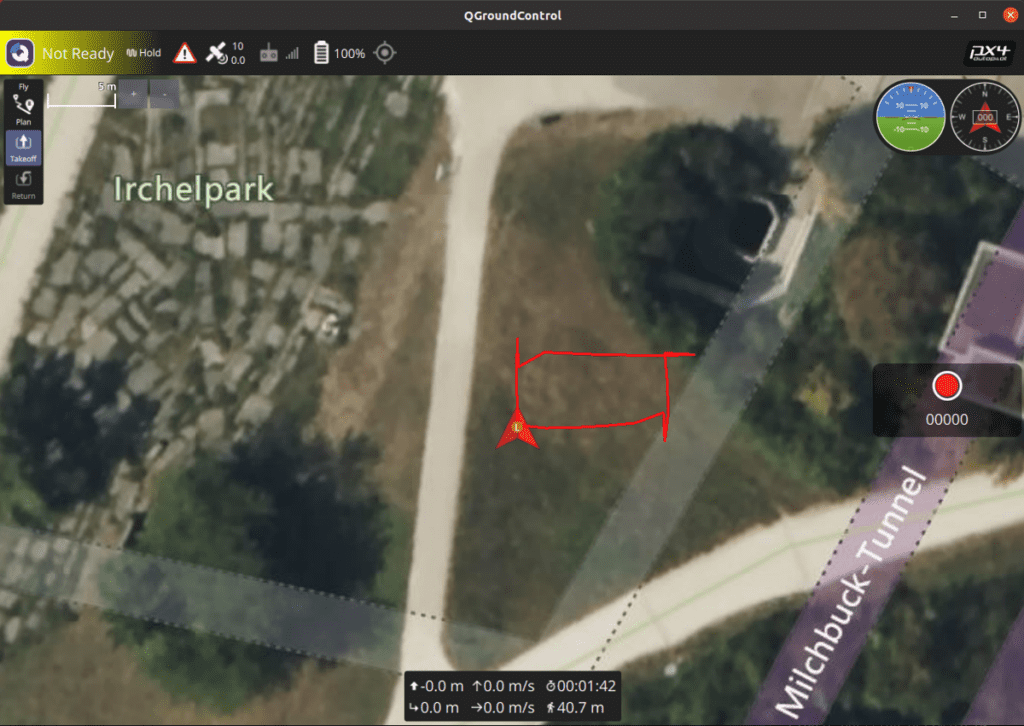
As the commands are executed, you can clearly see the vehicle smoothly taking off (Z-axis control), advancing North, and then making a sharp turn towards the East.
Moreover, observing how the drone’s camera (Nose) direction sharply rotates to face East (90 degrees) and South (180 degrees) regardless of its travel direction—according to the yaw_deg parameter changes—showcases a highly useful technique for securing the Camera Field of View (FOV) in vision-tracking-based autonomous flight research.
Wrapping Up
In this Part 8, we completely mastered the position control method based on the Local NED coordinate system (set_position_ned), which is the most intuitive and widely used feature in MAVSDK-Python’s Offboard mode.
While analyzing the code, we touched upon intricate details of autonomous flight programming, including the negative (-) representation of the Z-axis (altitude), the critical importance of injecting an initial EKF Origin, and the crucial role of asynchronous waiting (asyncio.sleep()).
However, position control alone has limitations when it comes to tracking fast-moving targets or creating natural curved evasive maneuvers. To address this, in our next post, [Part 9], we will dive deeply into ‘OFFBOARD Velocity Control (Based on BODY Frame)’, a much more dynamic technique widely utilized in robotics and autonomous flight research.
You will experience the thrill of intuitively commanding the drone based on its current facing direction, such as “Charge forward at 5m/s!”, moving far beyond merely navigating to coordinates.
If you encounter any errors during execution or have questions about the code, please feel free to leave a comment anytime. I sincerely cheer for your bug-free, smooth flights! Thank you.

Author: maponarooo, CEO of QUAD Drone Lab
Date: March 5, 2026
![PX4 MAVSDK – C++ Programming [Episode 10] Custom Logging and Integration Testing (gtest)](https://quad-drone-lab.co.kr/wp-content/uploads/2026/03/0320_인포그래피-768x419.jpg)
![[Hybrid Navigation System: Part 2] Principles of PX4 Autonomous Navigation and Gazebo SITL Simulator Configuration](https://quad-drone-lab.co.kr/wp-content/uploads/2026/04/PX4EKF2-Architecture-768x429.jpg)
![[Hybrid Navigation System: Special Edition] Survive GPS Jamming! A Complete Guide to “PX4 Dead-Reckoning Mode”](https://quad-drone-lab.co.kr/wp-content/uploads/2026/05/Resilient_Drone_Dead-Reckoning_Navigation-768x429.jpg)